
'%3e%3cpath%20d='M9%2021H15'%20stroke='black'%20stroke-width='2'%20stroke-linecap='round'%20stroke-linejoin='round'/%3e%3cpath%20d='M5.25001%209.75C5.25001%207.95979%205.96116%206.2429%207.22703%204.97703C8.4929%203.71116%2010.2098%203%2012%203C13.7902%203%2015.5071%203.71116%2016.773%204.97703C18.0388%206.2429%2018.75%207.95979%2018.75%209.75C18.75%2013.1081%2019.5281%2015.8063%2020.1469%2016.875C20.2126%2016.9888%2020.2472%2017.1179%2020.2474%2017.2493C20.2475%2017.3808%2020.2131%2017.5099%2020.1475%2017.6239C20.082%2017.7378%2019.9877%2017.8325%2019.8741%2017.8985C19.7604%2017.9645%2019.6314%2017.9995%2019.5%2018H4.50001C4.36874%2017.9992%204.23997%2017.964%204.12659%2017.8978C4.0132%2017.8317%203.91916%2017.7369%203.85387%2017.6231C3.78858%2017.5092%203.75432%2017.3801%203.75452%2017.2489C3.75472%2017.1176%203.78937%2016.9887%203.85501%2016.875C4.47282%2015.8063%205.25001%2013.1072%205.25001%209.75Z'%20stroke='black'%20stroke-width='2'%20stroke-linecap='round'%20stroke-linejoin='round'/%3e%3c/g%3e%3cdefs%3e%3cclipPath%20id='clip0_4762_133'%3e%3crect%20width='24'%20height='24'%20fill='white'/%3e%3c/clipPath%3e%3c/defs%3e%3c/svg%3e)
'%3e%3cpath%20d='M24%200H0V24H24V0Z'%20fill='white'%20fill-opacity='0.01'/%3e%3cpath%20d='M12%2011C14.2091%2011%2016%209.20914%2016%207C16%204.79086%2014.2091%203%2012%203C9.79086%203%208%204.79086%208%207C8%209.20914%209.79086%2011%2012%2011Z'%20stroke='black'%20stroke-width='2'%20stroke-linecap='round'%20stroke-linejoin='round'/%3e%3cpath%20d='M4%2021V20.4857C4%2018.5655%204%2017.6055%204.38753%2016.872C4.72841%2016.2269%205.27235%2015.7024%205.94138%2015.3737C6.70196%2015%207.6976%2015%209.68889%2015H14.3111C16.3024%2015%2017.298%2015%2018.0586%2015.3737C18.7276%2015.7024%2019.2716%2016.2269%2019.6125%2016.872C20%2017.6055%2020%2018.5655%2020%2020.4857V21'%20stroke='black'%20stroke-width='2'%20stroke-linecap='round'%20stroke-linejoin='round'/%3e%3c/g%3e%3cdefs%3e%3cclipPath%20id='clip0_4762_139'%3e%3crect%20width='24'%20height='24'%20fill='white'/%3e%3c/clipPath%3e%3c/defs%3e%3c/svg%3e)

MorphoTV---一款专为影视爱好者打造的在线免费观影资源整合站
Edward
看见这个标题,大家可能会有个疑问?我都有了LireTV和MoonTV了,为啥还需要再下一个MorphoTV呢?那么就让我一一道来它的独特之处在哪?
首先,打开应用,需要你进行系统化初始配置,如下图。
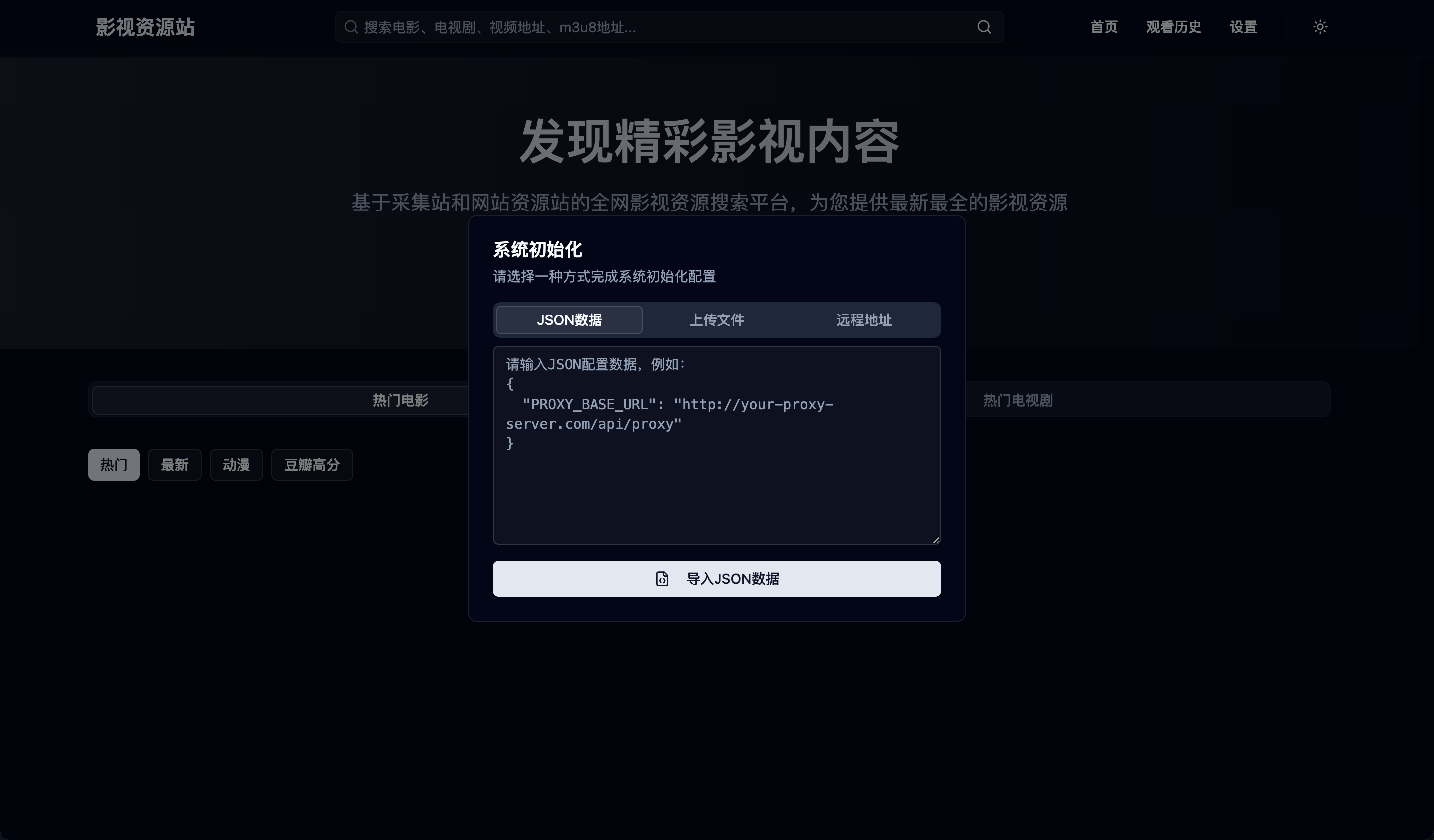
乍一看,我们肯定会觉得很繁琐,因为不会写这个参数,那么你可以使用我下面这个配置先复制粘贴进去。
简单配置:
{
  "PROXY_BASE_URL": "http://morphotv.你的懒猫盒子名.heiyu.space:3000/proxy/"
}
高配版
{
  "PROXY_BASE_URL": "http://morphotv.你的懒猫盒子名.heiyu.space:3000/proxy/",
  "tg_selected_model": 1750908942919,
  "tg_prompt": "",
  "search_sites": [
    {
      "id": "1748744344014",
      "name": "阿里云盘发布频道",
      "url": "https://t.me/s/shareAliyun?q={keyword}",
      "enabled": true
    },
    {
      "id": "1748744354447",
      "name": "肯德基の4K影视综合电影云盘站",
      "url": "https://t.me/s/XiangxiuNB?q={keyword}",
      "enabled": false
    },
    {
      "id": "1748744362990",
      "name": "夸克云盘综合资源",
      "url": "https://t.me/s/Quark_Movies?q={keyword}",
      "enabled": false
    },
    {
      "id": "1748744445095",
      "name": "阿里云盘4K影视",
      "url": "https://t.me/s/Aliyun_4K_Movies?q={keyword}",
      "enabled": false
    },
    {
      "id": "1748744491163",
      "name": "盘酱酱Club",
      "url": "https://t.me/s/PanjClub?q={keyword}",
      "enabled": false
    },
    {
      "id": "1749446702891",
      "name": "天翼云盘资源频道",
      "url": "https://t.me/s/tianyirigeng?q={keyword}",
      "enabled": false
    },
    {
      "id": "17494470388165",
      "name": "123云盘资源频道",
      "url": "https://t.me/s/xx123pan?q={keyword}",
      "enabled": false
    },
    {
      "id": "1749437038417",
      "name": "123云盘综合频道",
      "url": "https://t.me/s/zyzhpd123?q={keyword}",
      "enabled": false
    },
    {
      "id": "17494470128817",
      "name": "天翼云盘资源发布频道",
      "url": "https://t.me/s/cloudtianyi?q={keyword}",
      "enabled": false
    },
    {
      "id": "1749447038427",
      "name": "天翼云盘综合频道",
      "url": "https://t.me/s/tyypzhpd?q={keyword}",
      "enabled": false
    },
    {
      "id": "1749447258247",
      "name": "奥斯卡4K蓝光(精品)影视磁力站",
      "url": "https://t.me/s/Oscar_4Kmovies?q={keyword}",
      "enabled": false
    },
    {
      "id": "1749447035816",
      "name": "移动云盘资源分享",
      "url": "https://t.me/s/ydypzyfx?q={keyword}",
      "enabled": false
    },
    {
      "id": "1749547038817",
      "name": "百度网盘综合频道",
      "url": "https://t.me/s/bdwpzhpd?q={keyword}",
      "enabled": false
    },
    {
      "id": "1749447038817",
      "name": "综合频道",
      "url": "https://t.me/s/yunpanall?q={keyword}",
      "enabled": false
    },
    {
      "id": "1749447038417",
      "name": "夸克浏览器二三事",
      "url": "https://t.me/s/NewQuark?q={keyword}",
      "enabled": false
    },
    {
      "id": "1749447033817",
      "name": "阿里云盘吧(新)",
      "url": "https://t.me/s/NewAliPan?q={keyword}",
      "enabled": false
    },
    {
      "id": "1749447038815",
      "name": "百度网盘资源分享",
      "url": "https://t.me/s/BaiduCloudDisk?q={keyword}",
      "enabled": false
    },
    {
      "id": "1748447034817",
      "name": "网盘资源收藏(移动云盘)",
      "url": "https://t.me/s/yunpan139?q={keyword}",
      "enabled": false
    },
    {
      "id": "1749447834517",
      "name": "网盘资源收藏(UC网盘)",
      "url": "https://t.me/s/yunpanuc?q={keyword}",
      "enabled": false
    },
    {
      "id": "1746447038327",
      "name": "云盘资源发布频道",
      "url": "https://t.me/s/qixingzhenren?q={keyword}",
      "enabled": false
    },
    {
      "id": "1749447028417",
      "name": "爱影夸克频道",
      "url": "https://t.me/s/pankuake_share?q={keyword}",
      "enabled": false
    },
    {
      "id": "1749447038317",
      "name": "YOYO资源|夸克|短剧",
      "url": "https://t.me/s/yoyokuakeduanju?q={keyword}",
      "enabled": false
    },
    {
      "id": "1749447038215",
      "name": "Shares_115_Channel",
      "url": "https://t.me/s/Channel_Shares_115?q={keyword}",
      "enabled": false
    },
    {
      "id": "1749447034817",
      "name": "爷青回动画分享",
      "url": "https://t.me/s/yeqingjie_GJG666?q={keyword}",
      "enabled": false
    },
    {
      "id": "1749447037817",
      "name": "迅雷云盘",
      "url": "https://t.me/s/gotopan?q={keyword}",
      "enabled": false
    },
    {
      "id": "1744447038817",
      "name": "【热门网剧在线】",
      "url": "https://t.me/s/movielover8888_TV?q={keyword}",
      "enabled": false
    },
    {
      "id": "1749447031817",
      "name": "UC夸克百度迅雷资源分享",
      "url": "https://t.me/s/ucquark?q={keyword}",
      "enabled": false
    },
    {
      "id": "1749447034217",
      "name": "网盘资源(动画/动漫)频道",
      "url": "https://t.me/s/alyp_Animation?q={keyword}",
      "enabled": false
    }
  ],
  "ai_api_key": "",
  "m3u8ProxyList": [],
  "ai_api_url": "",
  "ANALYTICS_SCRIPT": "<script defer src=\"https://umi.itx7.top/script.js\" data-website-id=\"5896e4dd-8216-4ff1-8a44-257a08af3582\"></script>",
  "searchHistory": [],
  "immersiveTranslatePerformanceData": {
    "initial": 0,
    "buildContainer": 32,
    "consumeContainer": 33,
    "consumeParagraph": 138,
    "parseParagraph": 37,
    "translated": 2969,
    "inserted": 180728
  },
  "onlineParserList": [
    {
      "name": "虾米解析",
      "url": "https://jx.xmflv.com/?url={url}"
    },
    {
      "name": "虾米解析2",
      "url": "https://jx.xmflv.cc/?url={url}"
    },
    {
      "name": "剖云解析",
      "url": "https://www.pouyun.com/?url={url}"
    },
    {
      "name": "CK解析",
      "url": "https://www.ckplayer.vip/jiexi/?url={url}"
    },
    {
      "name": "盘古解析",
      "url": "http://www.pangujiexi.com/jiexi/?url={url}"
    },
    {
      "name": "m3u8解析",
      "url": "http://jx.m3u8.tv/jiexi/?url={url}"
    }
  ],
  "vite-ui-theme": "dark",
  "selectedApiSites": [
    "jisu",
    "heimuer",
    "wolong",
    "ffzy5"
  ]
}
点击导入json数据后,你就可以正式进入首页了
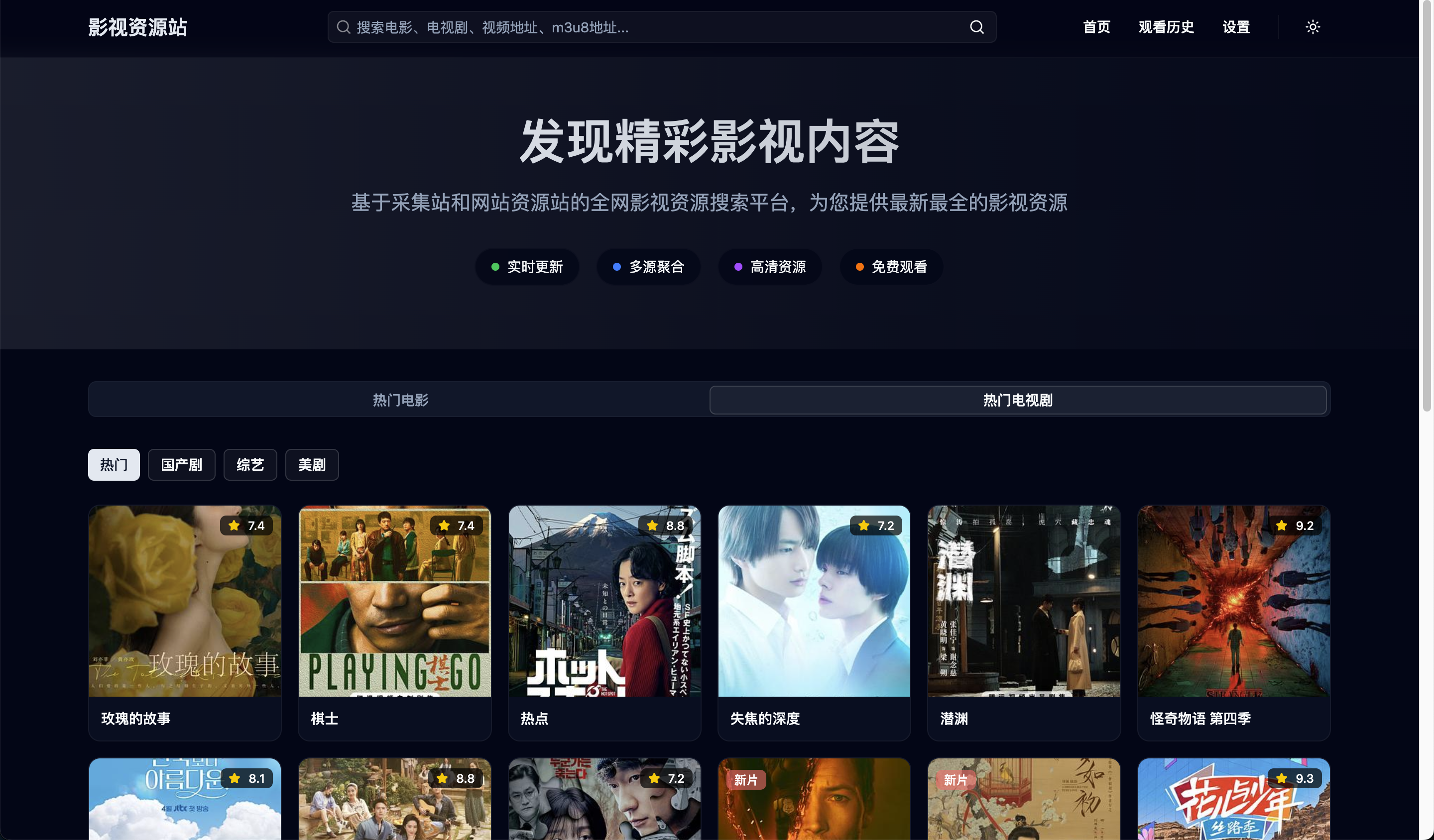
如果上述操作不成功的话,可以试试下述方式:
使用Deno来部署这个代理地址,具体方式如下:
-
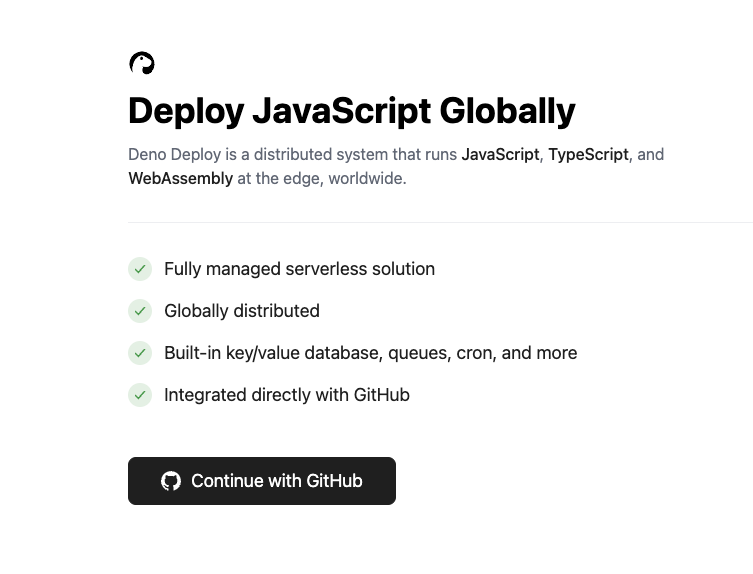
首先,打开Deno官网(https://dash.deno.com/)
-
点击“continue wwith Github"
-
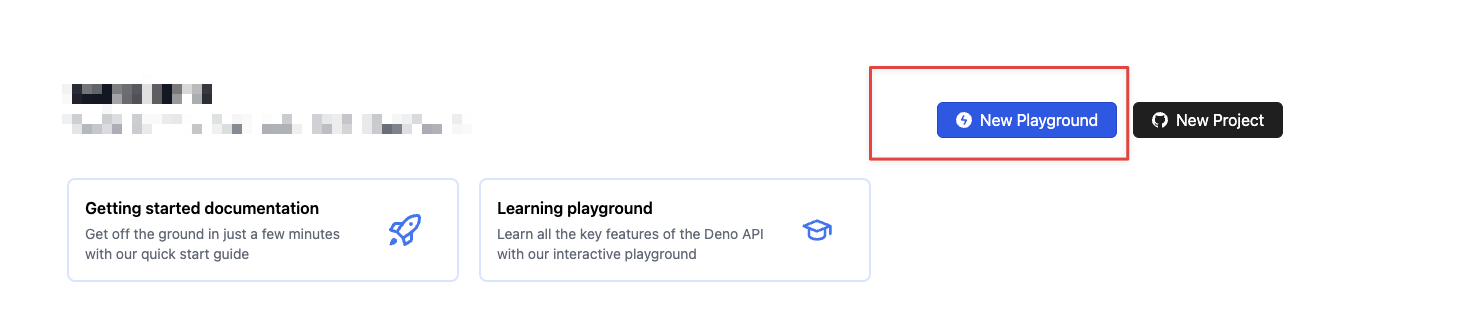
点击“New Playground"
-
在左侧输入以下代码
// MorphoTV 代理服务器 - 原始 Deno 版本
// 适用于本地 Deno 运行时

// 启用 CORS 支持的函数
function enableCors(response: Response): Response {
  response.headers.set("Access-Control-Allow-Origin", "*");
  response.headers.set("Access-Control-Allow-Methods", "GET, POST, PUT, DELETE, OPTIONS");
  response.headers.set("Access-Control-Allow-Headers", "Content-Type, Authorization");
  return response;
}

// 处理代理请求的函数
async function handleProxyRequest(req: Request): Promise<Response> {
  const url = new URL(req.url);

  // 提取目标 URL (去掉 `/proxy/` 前缀)
  const targetUrl = decodeURIComponent(url.pathname.replace("/proxy/", ""));

  if (!targetUrl) {
    return enableCors(
      new Response(JSON.stringify({ error: "Target URL is required!" }), {
        status: 400,
        headers: { "Content-Type": "application/json" },
      }),
    );
  }

  try {
    // 创建新的 Headers 对象
    const headers = new Headers();

    // 复制原始请求头,但排除一些不需要的头
    for (const [key, value] of req.headers.entries()) {
      if (!["host", "connection", "content-length"].includes(key.toLowerCase())) {
        headers.set(key, value);
      }
    }

    // 添加必要的 User-Agent 头
    headers.set(
      "User-Agent",
      "Mozilla/5.0 (Windows NT 10.0; Win64; x64) AppleWebKit/537.36 (KHTML, like Gecko) Chrome/91.0.4472.124 Safari/537.36",
    );

    // 配置请求选项
    const fetchOptions: RequestInit = {
      method: req.method,
      headers: headers,
    };

    // 如果请求不是 GET 方法,传递请求 body
    if (req.method !== "GET") {
      const body = await req.text();
      fetchOptions.body = body;
    }

    // 转发请求到目标服务器
    const proxyResponse = await fetch(targetUrl, fetchOptions);

    // 转发响应
    const responseBody = await proxyResponse.text();
    const response = new Response(responseBody, {
      status: proxyResponse.status,
      headers: proxyResponse.headers,
    });

    return enableCors(response);
  } catch (error) {
    console.error("Proxy error:", error);

    const errorMessage = {
      error: "Proxy error",
      message: error instanceof Error ? error.message : "Unknown error",
    };

    return enableCors(
      new Response(JSON.stringify(errorMessage), {
        status: 500,
        headers: { "Content-Type": "application/json" },
      }),
    );
  }
}

// 处理 HTTP 请求的主函数
async function handler(req: Request): Promise<Response> {
  const url = new URL(req.url);
  if (req.method === "OPTIONS") {
    // 处理预检请求
    return enableCors(new Response(null, { status: 204 }));
  } else if (url.pathname.startsWith("/proxy/")) {
    return handleProxyRequest(req);
  } else if (url.pathname === "/") {
    // 为根路径返回一个简单的页面
    const html = `
      <!DOCTYPE html>
      <html lang="zh-CN">
      <head>
        <meta charset="UTF-8">
        <meta name="viewport" content="width=device-width, initial-scale=1.0">
        <title>MorphoTV 代理服务器</title>
        <style>
          body {
            font-family: Arial, sans-serif;
            max-width: 800px;
            margin: 50px auto;
            padding: 20px;
            background: #f5f5f5;
          }
          .container {
            background: white;
            padding: 30px;
            border-radius: 10px;
            box-shadow: 0 2px 10px rgba(0,0,0,0.1);
          }
          .status { color: #28a745; font-weight: bold; }
          .endpoint {
            background: #f8f9fa;
            padding: 10px;
            border-radius: 5px;
            font-family: monospace;
            border-left: 4px solid #007bff;
            margin: 15px 0;
          }
          h1 { color: #007bff; }
          .badge {
            background: #6c757d;
            color: white;
            padding: 4px 8px;
            border-radius: 4px;
            font-size: 12px;
          }
        </style>
      </head>
      <body>
        <div class="container">
          <h1>🎬 MorphoTV 代理服务器</h1>
          <span class="badge">Deno Runtime</span>
          <p class="status">✅ 服务器运行正常</p>
          <h2>使用方法</h2>
          <p>在 MorphoTV 初始化界面输入以下代理地址:</p>
          <div class="endpoint">${req.url}proxy/</div>
          <h2>功能特性</h2>
          <ul>
            <li>✅ 支持 CORS 跨域请求</li>
            <li>✅ 自动转发请求头</li>
            <li>✅ 支持所有 HTTP 方法</li>
            <li>✅ 错误处理和日志记录</li>
            <li>✅ TypeScript 原生支持</li>
          </ul>
          <h2>本地运行</h2>
          <p>使用以下命令启动服务器:</p>
          <div class="endpoint">deno run --allow-net --allow-env deno-proxy-original.ts</div>
          <p><small>Powered by Deno Runtime</small></p>
        </div>
      </body>
      </html>
    `;
    return enableCors(new Response(html, { status: 200, headers: { "Content-Type": "text/html; charset=utf-8" } }));
  } else {
    return enableCors(
      new Response("Not Found", { status: 404, headers: { "Content-Type": "text/plain" } }),
    );
  }
}

// 本地 Deno 运行时启动服务器
if (import.meta.main) {
  const port = Number(Deno.env.get("PORT")) || 8080;

  console.log(`🦕 MorphoTV 代理服务器启动中...`);
  console.log(`📍 服务器地址: http://localhost:${port}`);
  console.log(`🔗 代理端点: http://localhost:${port}/proxy/`);

  Deno.serve({ port }, handler);
}

// 导出 handler 函数供 Deno Deploy 使用
export default handler;
-
输入完后,点击“save & deploy"
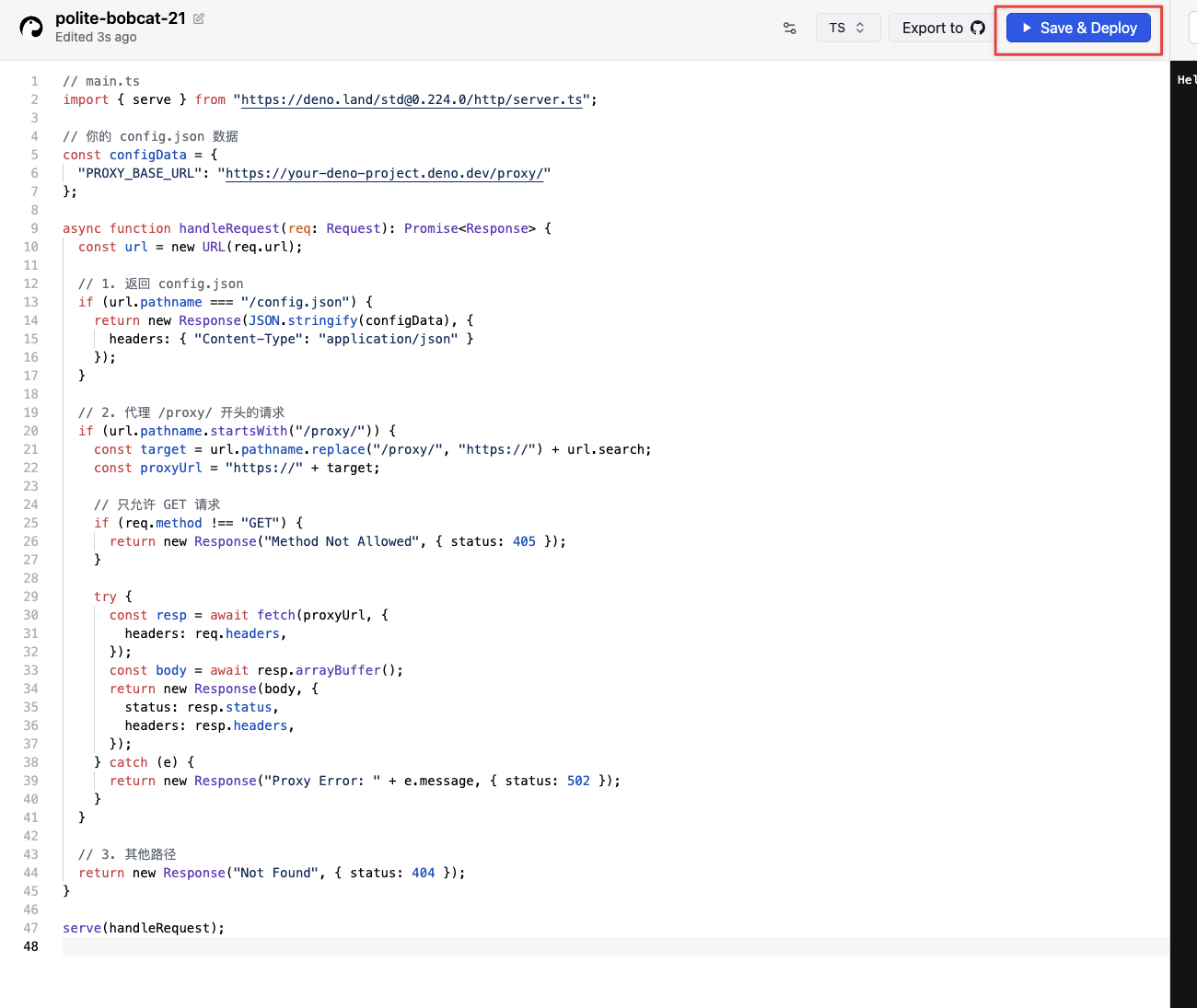
-
右侧显示信息就代表部署成功了,按照图中指示复制对应地址
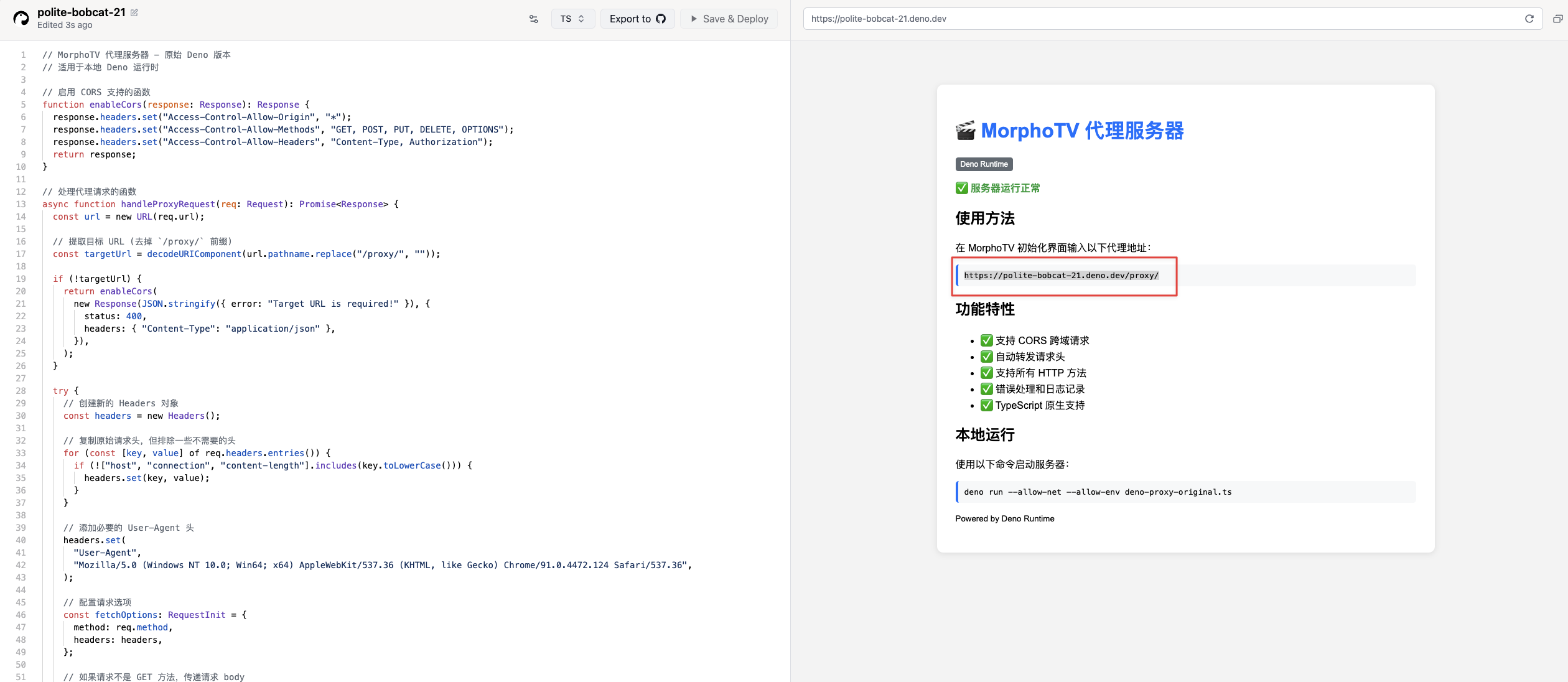
-
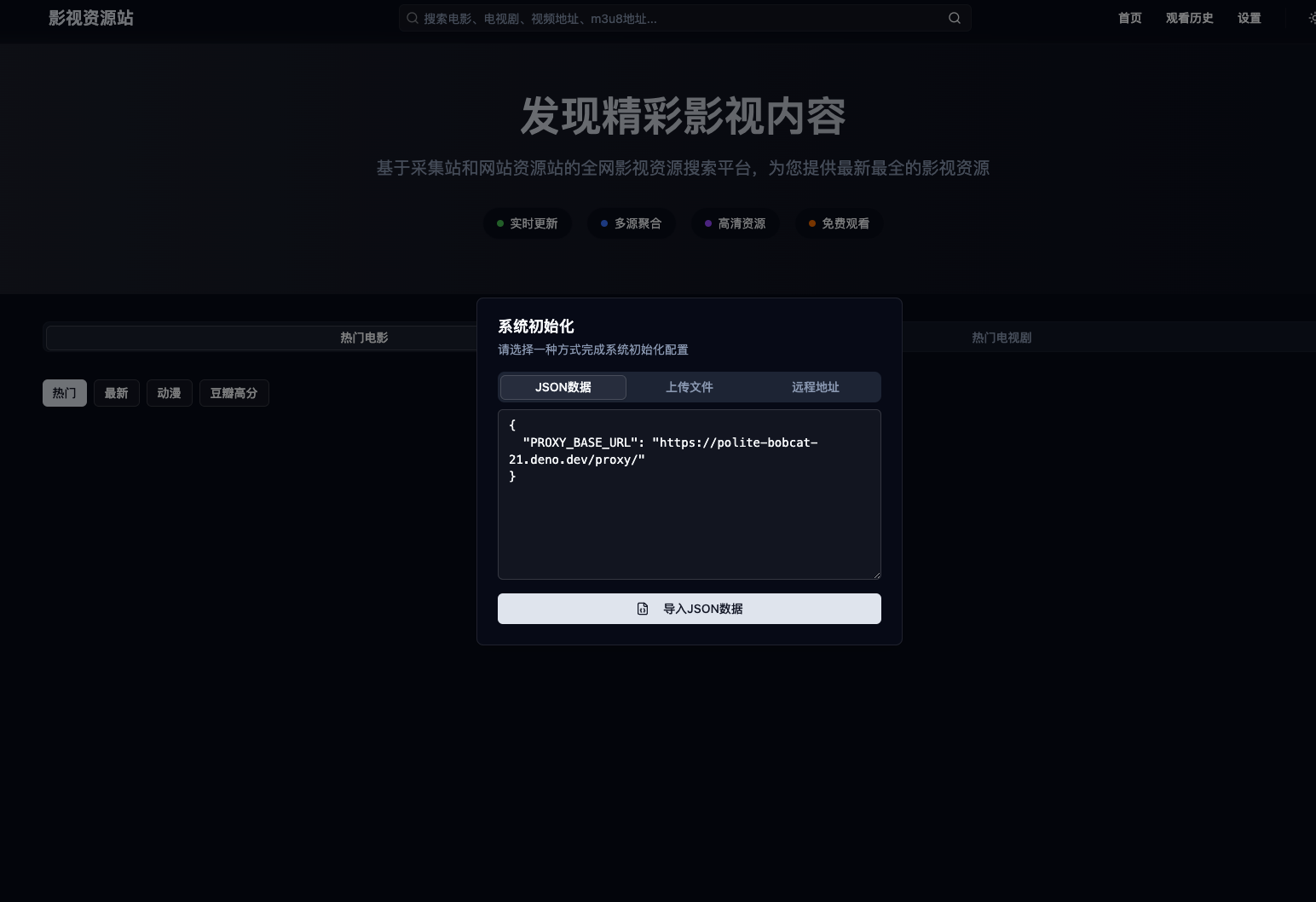
打开Morphotv,替换下图“你生成的代理地址”,复制粘贴进去,点击”导入JSON数据“
{
  "PROXY_BASE_URL": "你生成的代理地址"
}
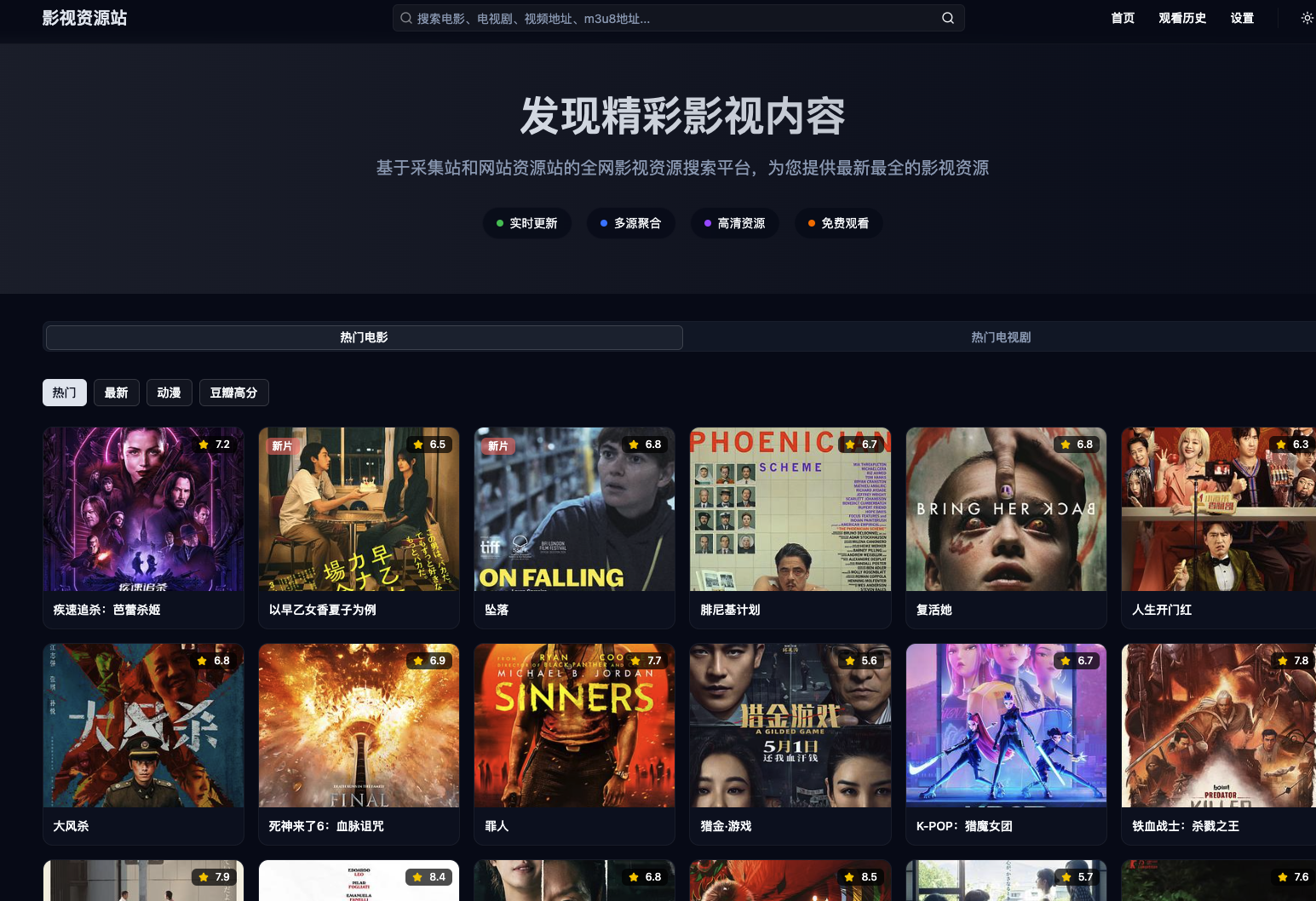
- 稍等加载就可以开始你的观影之旅了
接下来就说到这个网站三种获取资源的方式:
- 采集站:适合追剧,对清晰度和存在广告不是特别敏感的人。
- 解析站:适合观看一些国内VIP视频站专有的视频。
- 网盘站:影片质量高,较少可能会有广告。适合有网盘会员,并且对影片质量要求高的人。
1.采集站,这种如果用过LibreTV和MoonTV就会了解的,下图是MoonTV内的搜索结果

下图是MorphoTV的搜索结果
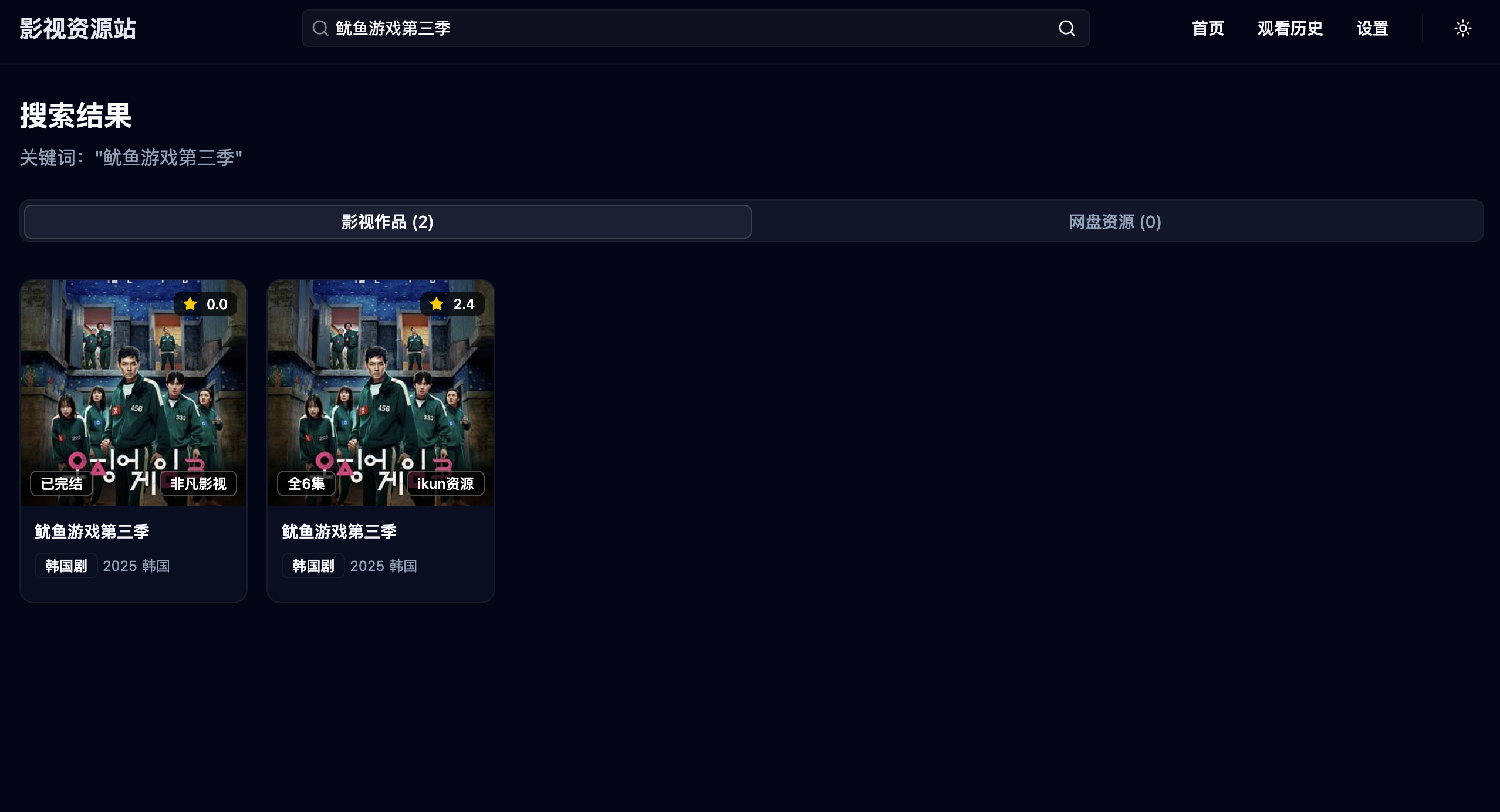
常规使用的谷歌自己搜就能很多,关键词”视频采集站“,或者可以打开这个链接,然后你可以对应的在MorphoTV里添加你需要的采集站点地址
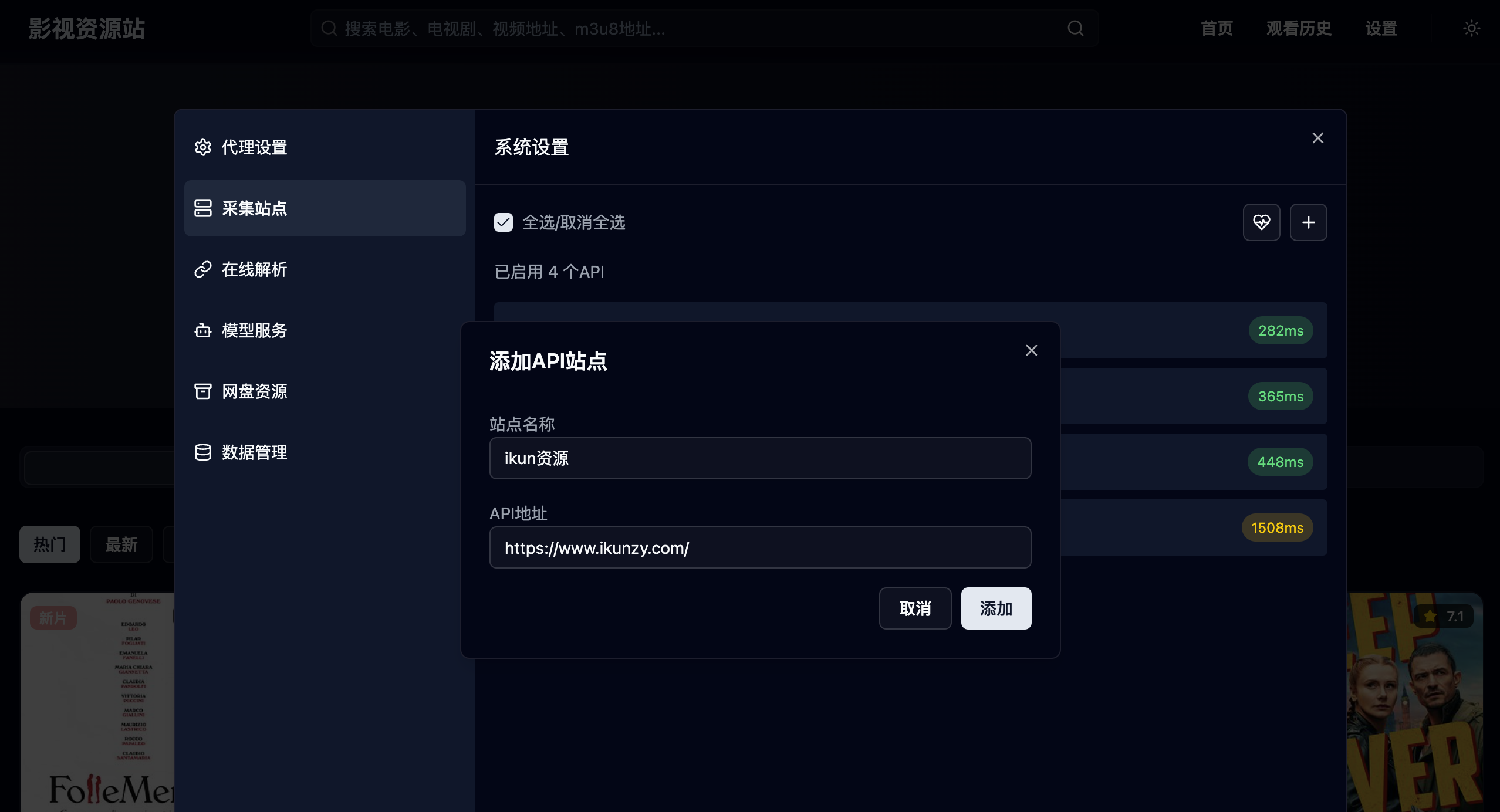
比如我添加这个“ikun资源"(https://www.ikunzy.com/), 点击右上角设置--采集站点--点击”+“,然后按照下图添加对应信息,如果有失败的话,换其他站点尝试,可能原因是采集规则不一样,不过影响不大。
添加完之后如下图,可以通过勾选之后,这样搜索资源的时候就会带上。也可以点击”健康值“
按钮进行测速,这样你就可以挑选延迟较低的站点进行查找资源,方便你观影的体验。
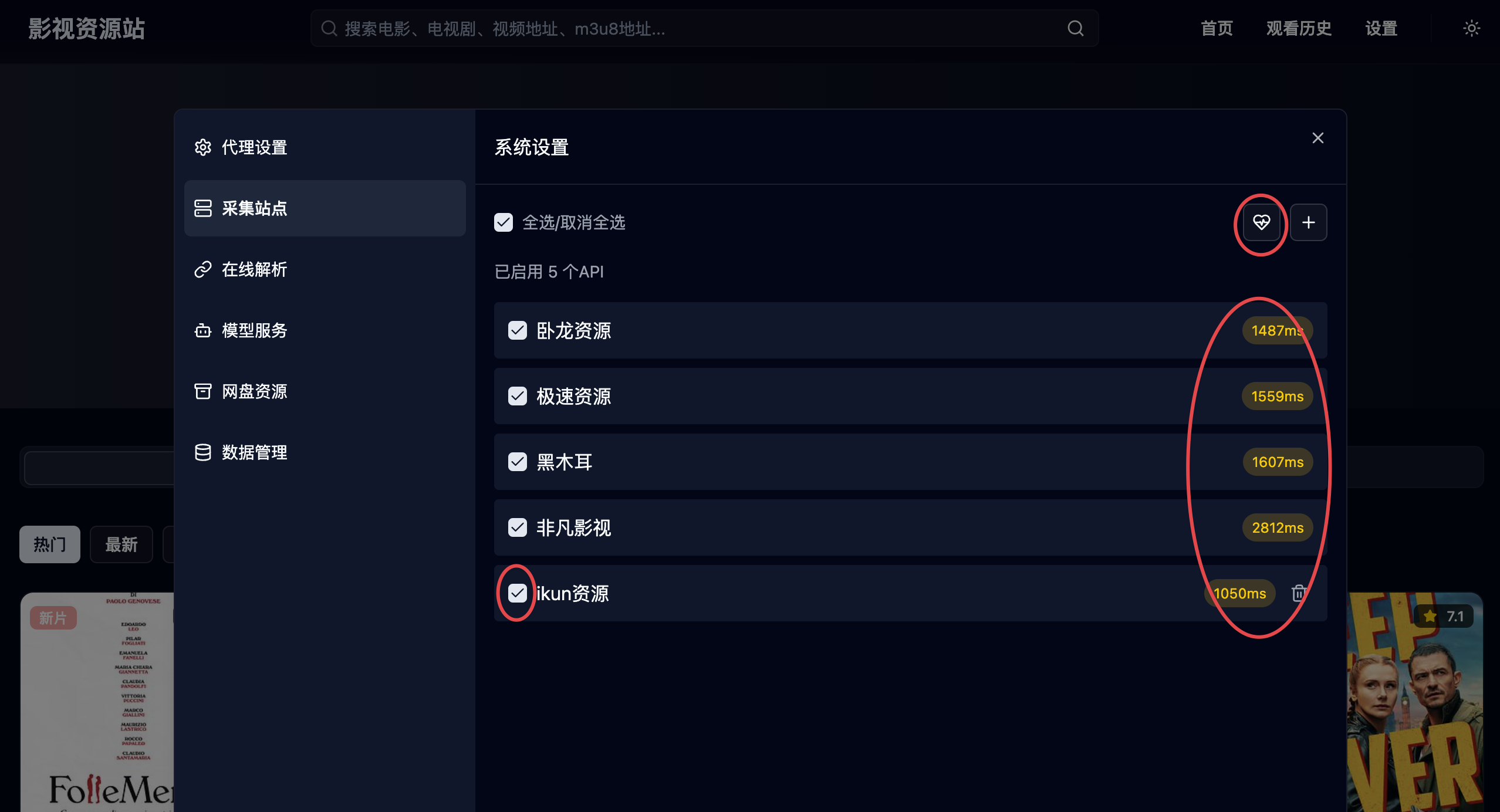
这种方式可以添加一些你喜爱的采集站点,也方便你搜索时只显示其搜索结果。
2.解析站点,这种操作方式最简单,直接复制vip视频链接,然后放在搜索框里直接点击搜索就行,效果如下。如果当前解析点不行,可以切换解析点进行尝试。
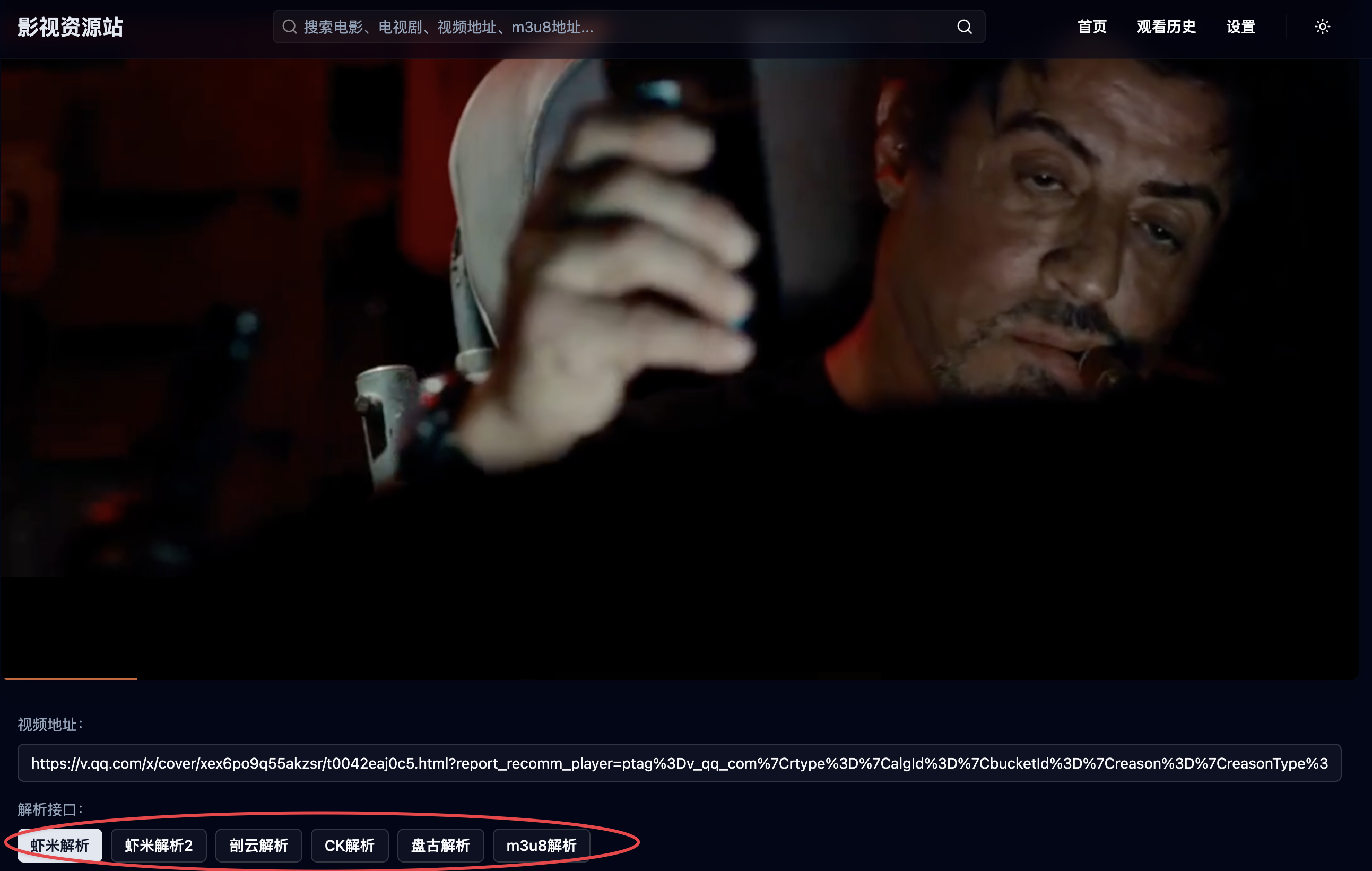
当然,你自己也可以添加新的解析点,推荐两个解析站点,添加方式如下:
https://jx.973973.xyz/?url={url}
https://jx.pxjx.cc/?url={url}
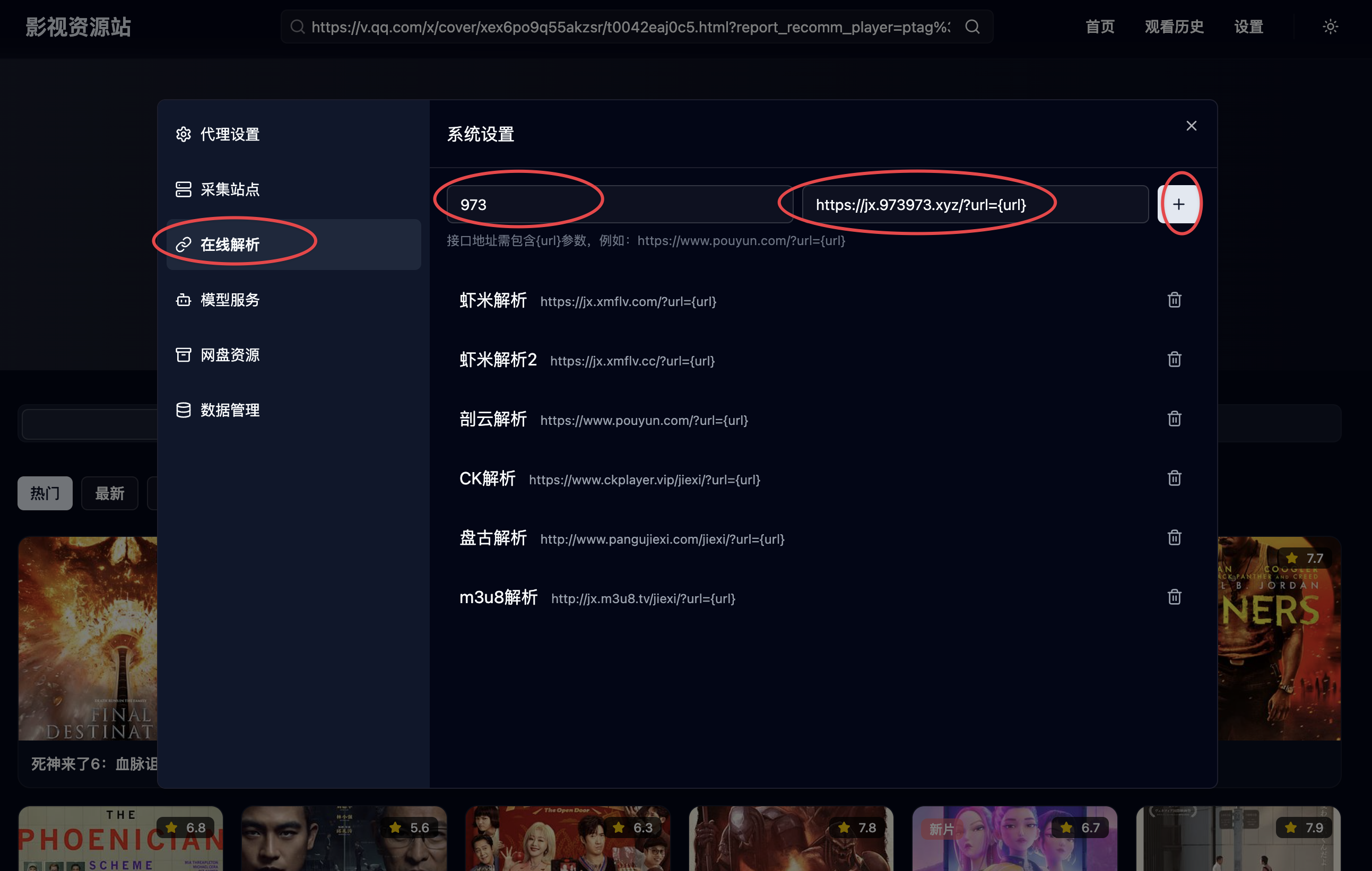
另外,这个解析站点也支持m3u8解析
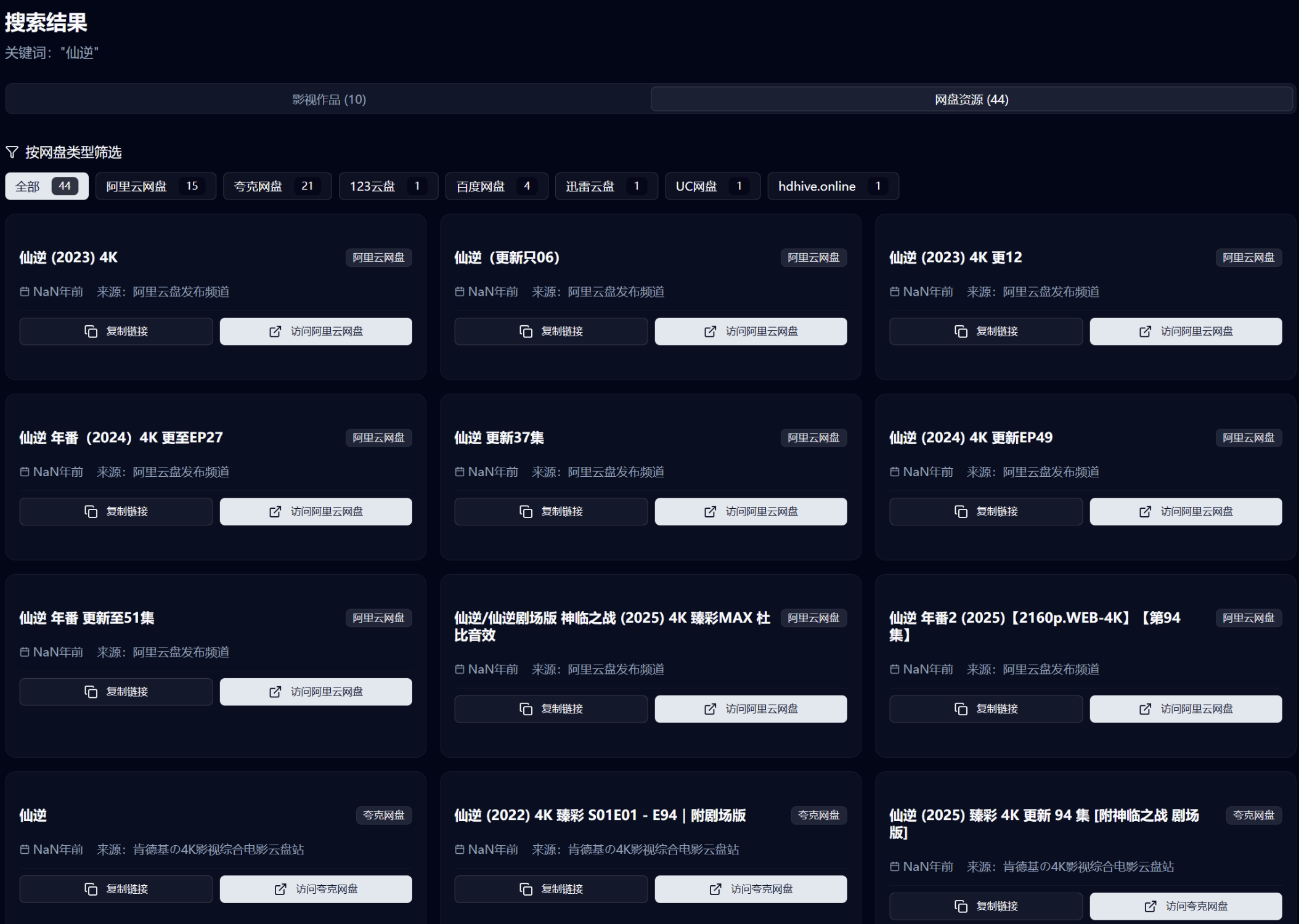
3.网盘站点,这个要求有点高。网盘的搜索原理是将网盘资源站的搜索结果html内容扔给AI大模型提取,速度的快慢取决于你用的AI接口和模型能力,建议用 gemini-2.0-flash-lite-001这种语义理解能力还可以,处理速度快的小模型。还有在设置里的网盘资源站,不要启用太多,这个也影响速度。搜索结果如下:
基础功能已经讲完了,剩下的就按需设置,创建属于自己的影视世界吧。
评论
2Json长了之后那个添加这一层的按钮会被挤到屏幕外面去0
我的moonTV收不出来 鱿鱼游戏