
'%3e%3cpath%20d='M9%2021H15'%20stroke='black'%20stroke-width='2'%20stroke-linecap='round'%20stroke-linejoin='round'/%3e%3cpath%20d='M5.25001%209.75C5.25001%207.95979%205.96116%206.2429%207.22703%204.97703C8.4929%203.71116%2010.2098%203%2012%203C13.7902%203%2015.5071%203.71116%2016.773%204.97703C18.0388%206.2429%2018.75%207.95979%2018.75%209.75C18.75%2013.1081%2019.5281%2015.8063%2020.1469%2016.875C20.2126%2016.9888%2020.2472%2017.1179%2020.2474%2017.2493C20.2475%2017.3808%2020.2131%2017.5099%2020.1475%2017.6239C20.082%2017.7378%2019.9877%2017.8325%2019.8741%2017.8985C19.7604%2017.9645%2019.6314%2017.9995%2019.5%2018H4.50001C4.36874%2017.9992%204.23997%2017.964%204.12659%2017.8978C4.0132%2017.8317%203.91916%2017.7369%203.85387%2017.6231C3.78858%2017.5092%203.75432%2017.3801%203.75452%2017.2489C3.75472%2017.1176%203.78937%2016.9887%203.85501%2016.875C4.47282%2015.8063%205.25001%2013.1072%205.25001%209.75Z'%20stroke='black'%20stroke-width='2'%20stroke-linecap='round'%20stroke-linejoin='round'/%3e%3c/g%3e%3cdefs%3e%3cclipPath%20id='clip0_4762_133'%3e%3crect%20width='24'%20height='24'%20fill='white'/%3e%3c/clipPath%3e%3c/defs%3e%3c/svg%3e)
'%3e%3cpath%20d='M24%200H0V24H24V0Z'%20fill='white'%20fill-opacity='0.01'/%3e%3cpath%20d='M12%2011C14.2091%2011%2016%209.20914%2016%207C16%204.79086%2014.2091%203%2012%203C9.79086%203%208%204.79086%208%207C8%209.20914%209.79086%2011%2012%2011Z'%20stroke='black'%20stroke-width='2'%20stroke-linecap='round'%20stroke-linejoin='round'/%3e%3cpath%20d='M4%2021V20.4857C4%2018.5655%204%2017.6055%204.38753%2016.872C4.72841%2016.2269%205.27235%2015.7024%205.94138%2015.3737C6.70196%2015%207.6976%2015%209.68889%2015H14.3111C16.3024%2015%2017.298%2015%2018.0586%2015.3737C18.7276%2015.7024%2019.2716%2016.2269%2019.6125%2016.872C20%2017.6055%2020%2018.5655%2020%2020.4857V21'%20stroke='black'%20stroke-width='2'%20stroke-linecap='round'%20stroke-linejoin='round'/%3e%3c/g%3e%3cdefs%3e%3cclipPath%20id='clip0_4762_139'%3e%3crect%20width='24'%20height='24'%20fill='white'/%3e%3c/clipPath%3e%3c/defs%3e%3c/svg%3e)

在懒猫上实现应用持久化(二):Nix 安装配置工程化指南
隔壁老王
发布于133天前还没想好签名
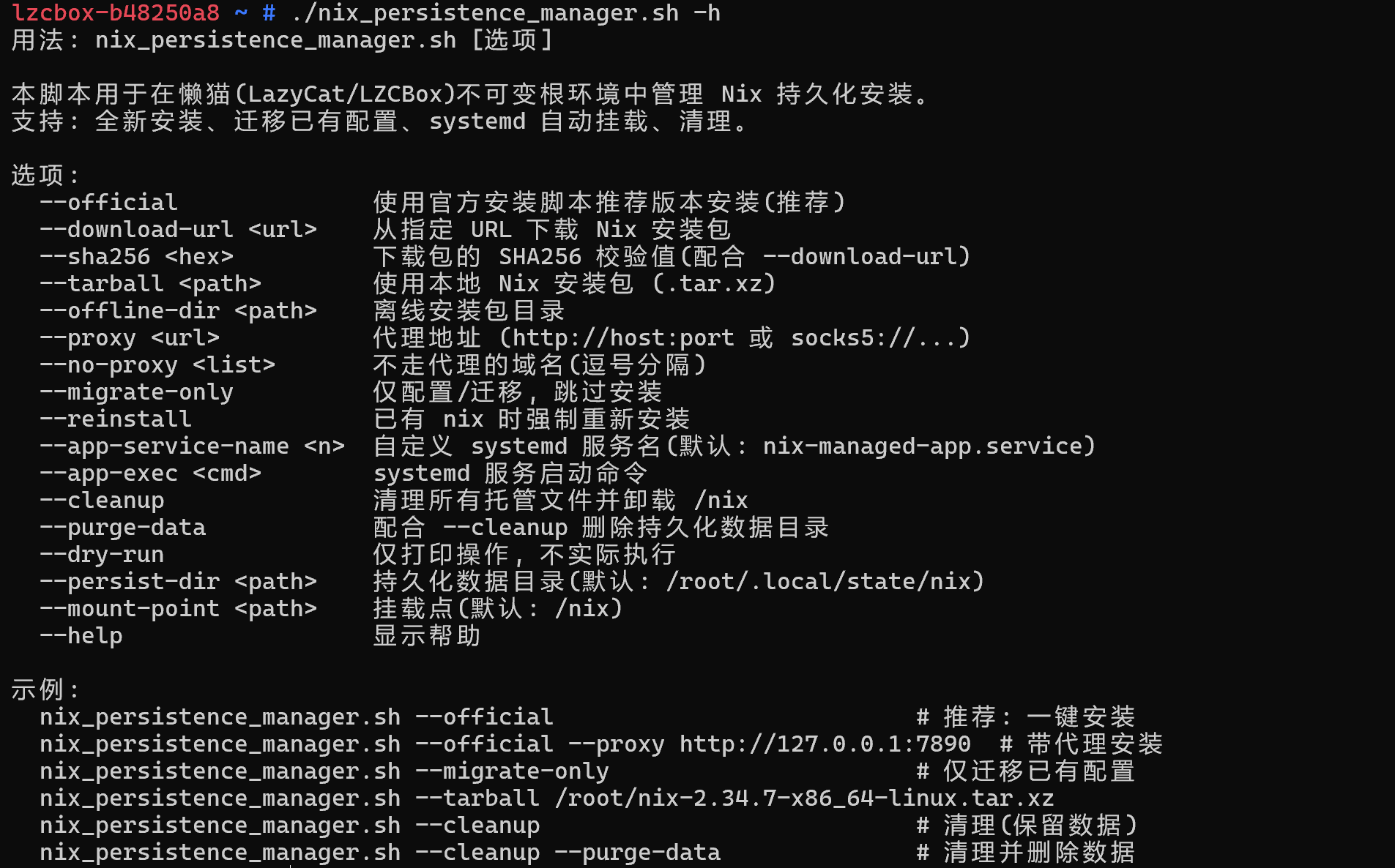
面向懒猫平台(LZCBox)x86_64 系统的 Nix 持久化方案
从能用到长期可运维的工程化脚本。
脚本地址:
https://github.com/lazycat-contrib/nix_persistence_manager.sh
一、前言:这次我们要解决什么问题?
第一篇《Nix 安装与配置完全指南》已经证明了路线可行:
- 用 bind mount 把持久目录映射到
/nix - 用单用户模式安装 Nix
- 重启后依然可恢复使用
但当你开始长期使用,会出现更"运维化"的需求:
- 无人登录也要能启动服务 — 只靠
.profile的挂载触发不够。 - 从旧配置迁移到新规范要可重复 — 手动迁移容易遗漏。
- 网络环境复杂,安装路径要弹性 — 代理与离线包都要支持。
- 变更要可预演、可回退 — 先看将执行什么;不需要时也要可清理。
所以本篇目标是把整套流程工程化为一个脚本:
- 既支持全新安装(推荐使用官方安装器获取最新版本)
- 也支持旧配置迁移
- 并且把自启动、离线、代理、清理都纳入同一工具
二、为什么在懒猫上必须这么设计?
1. 懒猫系统强调稳定底座
懒猫采用只读系统镜像 + Overlay 的架构:
- 核心系统稳定、可恢复
- 不能把长期状态寄托在"临时可写层"上
2. /etc 不是可靠持久入口
所以要把可持久化配置放在允许长期保存的区域(例如 /root),并优先采用用户域机制(systemd --user)。
3. 为什么坚持 /nix 用 bind mount
Nix 生态里大量工具默认使用绝对路径 /nix/store。bind mount 的优点:
- 对程序来说,
/nix仍是"真实路径入口" - 对存储来说,数据实际落在持久目录
4. 为什么要双触发(.profile + nix-ready)
.profile:照顾交互登录体验,登录后自动准备环境。nix-ready:作为硬兜底,任何命令执行前都能先检查并补挂载。
三、准备工作
- 已通过 SSH 登录懒猫,并拥有 root 权限。
- 将脚本放到
/root:
mv nix_persistence_manager.sh /root/
chmod +x /root/nix_persistence_manager.sh
四、快速开始(推荐方式)
一键安装,使用官方推荐版本:
/root/nix_persistence_manager.sh --official
带代理:
/root/nix_persistence_manager.sh --official --proxy http://172.18.0.1:10809
脚本会自动:
- 从
https://nixos.org/nix/install获取官方安装脚本。 - 解析出当前推荐版本(如 2.34.7)和 SHA256。
- 下载、校验、安装。
- 配置 bind mount、profile、systemd 服务。
- 清理官方安装器产生的冗余配置(
.profile冗余行、fish 配置)。
五、脚本能力总览
脚本文件:nix_persistence_manager.sh(约 830 行,仅支持 x86_64-linux)
| 能力 | 说明 |
|---|---|
| 全新安装 | --official 自动获取官方推荐版本 |
| 迁移配置 | --migrate-only 迁移到隐藏持久目录 |
| bind mount | 自动维护 /nix 挂载 |
| nix.conf | 生成并维护 Nix 配置 |
| 辅助工具 | nix-ready / nix-gc / nix-doctor-lite |
| systemd 服务 | nix-bind.service 自动挂载 + linger |
| 代理支持 | --proxy 统一代理出口 |
| 离线安装 | --tarball 或 --offline-dir |
| 预演模式 | --dry-run 仅打印不执行 |
| 清理回退 | --cleanup / --cleanup --purge-data |
六、详细教程
第一步:先做预演(强烈建议)
/root/nix_persistence_manager.sh --dry-run --migrate-only
提前确认目录、挂载、systemd 操作是否符合预期。
第二步:安装(推荐使用官方安装器)
# 推荐:自动获取官方最新版本
/root/nix_persistence_manager.sh --official

# 带代理
/root/nix_persistence_manager.sh --official --proxy http://172.18.0.1:10809

# 已有 nix 时强制重装
/root/nix_persistence_manager.sh --official --reinstall
其他安装方式
本地离线包
/root/nix_persistence_manager.sh --tarball /root/nix-2.34.7-x86_64-linux.tar.xz
离线目录
/root/nix_persistence_manager.sh --offline-dir /root/offline-packages
脚本会自动在目录内查找 nix-*-x86_64-linux.tar.xz。
手动指定 URL + SHA256
/root/nix_persistence_manager.sh \
  --download-url https://releases.nixos.org/nix/nix-2.34.7/nix-2.34.7-x86_64-linux.tar.xz \
  --sha256 <SHA256值>
第三步:迁移已有环境(如果之前已手动安装过)
/root/nix_persistence_manager.sh --migrate-only
它会:
- 探测旧数据来源(
/root/nix_persistent、旧/nix挂载等)。 - 同步到新隐藏目录(默认
/root/.local/state/nix)。 - 配置 bind mount、profile、systemd 服务。
第四步:开机无人登录也能跑(systemd --user)
/root/nix_persistence_manager.sh \
  --migrate-only \
  --app-service-name my-nix-app \
  --app-exec '/root/.nix-profile/bin/your-binary --flag'
脚本会:
- 生成
nix-bind.service(先确保/nix可用)。 - 生成 app service(依赖
nix-bind.service)。 - 自动检查并尝试
loginctl enable-linger root。
七、.profile 结构说明
安装完成后,.profile 结构如下:
# ~/.profile
if [ -n "$BASH_VERSION" ]; then
    if [ -f "$HOME/.bashrc" ]; then
        . "$HOME/.bashrc"
    fi
fi

# >>> nix-persistence profile.d loader >>>
if [ -d "/root/.profile.d" ]; then
  for _p in "/root/.profile.d"/*.sh; do
    [ -r "$_p" ] && . "$_p"
  done
  unset _p
fi
# <<< nix-persistence profile.d loader <<<
nix-bind-mount.sh 内容:
# 挂载 /nix
if ! mountpoint -q "/nix"; then
  if [ -L "/nix" ]; then rm -f "/nix"; fi
  mkdir -p "/nix"
  mount --bind "/root/.local/state/nix" "/nix" 2>/dev/null || true
fi
# source nix profile(设置 PATH 等)
if [ -e "/root/.nix-profile/etc/profile.d/nix.sh" ]; then
  . "/root/.nix-profile/etc/profile.d/nix.sh"
fi
# 添加辅助工具到 PATH
case ":$PATH:" in
  *":/root/.local/bin:"*) ;;
  *) export PATH="/root/.local/bin:$PATH" ;;
esac
关键点:
- 挂载和 nix profile 初始化都在
nix-bind-mount.sh里完成。 - 官方安装器添加的冗余行会被自动清理。
- fish 配置(
nix.fish)会被自动移除(懒猫只用 bash)。
八、验证与日常使用
# 验证挂载
findmnt /nix

# 验证 Nix
/root/.local/bin/nix-ready nix --version

# 查看服务状态
systemctl --user status nix-bind.service

# 垃圾回收
/root/.local/bin/nix-gc
九、清理与回退
# 仅清理脚本管理产物(保留 Nix 数据)
/root/nix_persistence_manager.sh --cleanup

# 彻底清理(包含持久化数据)
/root/nix_persistence_manager.sh --cleanup --purge-data
十、常见问题
Q: 安装时提示 "xz not found"
脚本会自动安装 xz-utils。如果网络不通,可提前手动安装:
apt install -y xz-utils
Q: 遇到 .../deleted 报文
表示之前 /nix 的挂载源目录 inode 已被删除。建议:
umount /nix || umount -l /nix
# 找到仍有 store 数据的旧目录
for d in /var/roothome/nix_persistent /var/roothome/.local/state/nix /root/nix_persistent; do
  if [ -d "$d/store" ] && [ -n "$(ls -A "$d/store" 2>/dev/null)" ]; then
    rsync -aHAX "$d"/ /root/.local/state/nix/
    break
  fi
done
mount --bind /root/.local/state/nix /nix
Q: 官方安装器提示 "install Nix as root is not supported"
这是官方安装器的警告,单用户模式下可以忽略。脚本使用 --no-daemon 参数以单用户模式安装。
Q: 如何查看当前安装的版本
/root/.local/bin/nix-ready nix --version
十一、总结
在懒猫平台上做 Nix,核心不是"装上就行",而是"长期稳定可运维"。
这套方案的关键价值:
- 尊重平台边界 — 不污染系统底座。
- 保证
/nix语义稳定 — bind mount。 - 同时覆盖交互与无人值守场景 — profile + systemd user + linger + nix-ready。
- 在真实网络条件下仍可部署 — 代理 + 离线 + 校验。
- 有预演和回退路径 — dry-run + cleanup。
- 自动获取官方最新版本 —
--official无需手动选择版本。
评论
0暂无评论