
'%3e%3cpath%20d='M9%2021H15'%20stroke='black'%20stroke-width='2'%20stroke-linecap='round'%20stroke-linejoin='round'/%3e%3cpath%20d='M5.25001%209.75C5.25001%207.95979%205.96116%206.2429%207.22703%204.97703C8.4929%203.71116%2010.2098%203%2012%203C13.7902%203%2015.5071%203.71116%2016.773%204.97703C18.0388%206.2429%2018.75%207.95979%2018.75%209.75C18.75%2013.1081%2019.5281%2015.8063%2020.1469%2016.875C20.2126%2016.9888%2020.2472%2017.1179%2020.2474%2017.2493C20.2475%2017.3808%2020.2131%2017.5099%2020.1475%2017.6239C20.082%2017.7378%2019.9877%2017.8325%2019.8741%2017.8985C19.7604%2017.9645%2019.6314%2017.9995%2019.5%2018H4.50001C4.36874%2017.9992%204.23997%2017.964%204.12659%2017.8978C4.0132%2017.8317%203.91916%2017.7369%203.85387%2017.6231C3.78858%2017.5092%203.75432%2017.3801%203.75452%2017.2489C3.75472%2017.1176%203.78937%2016.9887%203.85501%2016.875C4.47282%2015.8063%205.25001%2013.1072%205.25001%209.75Z'%20stroke='black'%20stroke-width='2'%20stroke-linecap='round'%20stroke-linejoin='round'/%3e%3c/g%3e%3cdefs%3e%3cclipPath%20id='clip0_4762_133'%3e%3crect%20width='24'%20height='24'%20fill='white'/%3e%3c/clipPath%3e%3c/defs%3e%3c/svg%3e)
'%3e%3cpath%20d='M24%200H0V24H24V0Z'%20fill='white'%20fill-opacity='0.01'/%3e%3cpath%20d='M12%2011C14.2091%2011%2016%209.20914%2016%207C16%204.79086%2014.2091%203%2012%203C9.79086%203%208%204.79086%208%207C8%209.20914%209.79086%2011%2012%2011Z'%20stroke='black'%20stroke-width='2'%20stroke-linecap='round'%20stroke-linejoin='round'/%3e%3cpath%20d='M4%2021V20.4857C4%2018.5655%204%2017.6055%204.38753%2016.872C4.72841%2016.2269%205.27235%2015.7024%205.94138%2015.3737C6.70196%2015%207.6976%2015%209.68889%2015H14.3111C16.3024%2015%2017.298%2015%2018.0586%2015.3737C18.7276%2015.7024%2019.2716%2016.2269%2019.6125%2016.872C20%2017.6055%2020%2018.5655%2020%2020.4857V21'%20stroke='black'%20stroke-width='2'%20stroke-linecap='round'%20stroke-linejoin='round'/%3e%3c/g%3e%3cdefs%3e%3cclipPath%20id='clip0_4762_139'%3e%3crect%20width='24'%20height='24'%20fill='white'/%3e%3c/clipPath%3e%3c/defs%3e%3c/svg%3e)

告别 DSL!我用 MCP 让 AI 帮我操作 Easysearch
忘机山人
还在为记不住 Elasticsearch DSL 语法发愁?match 和 term 傻傻分不清?聚合查询写半天还报错?
今天教你用 MCP(Model Context Protocol)封装 Easysearch,让 AI 帮你操作集群。从此告别 DSL,用自然语言就能完成搜索、写入、聚合统计!
效果演示
先看看最终效果。以下是我和 Kiro 的真实对话记录:
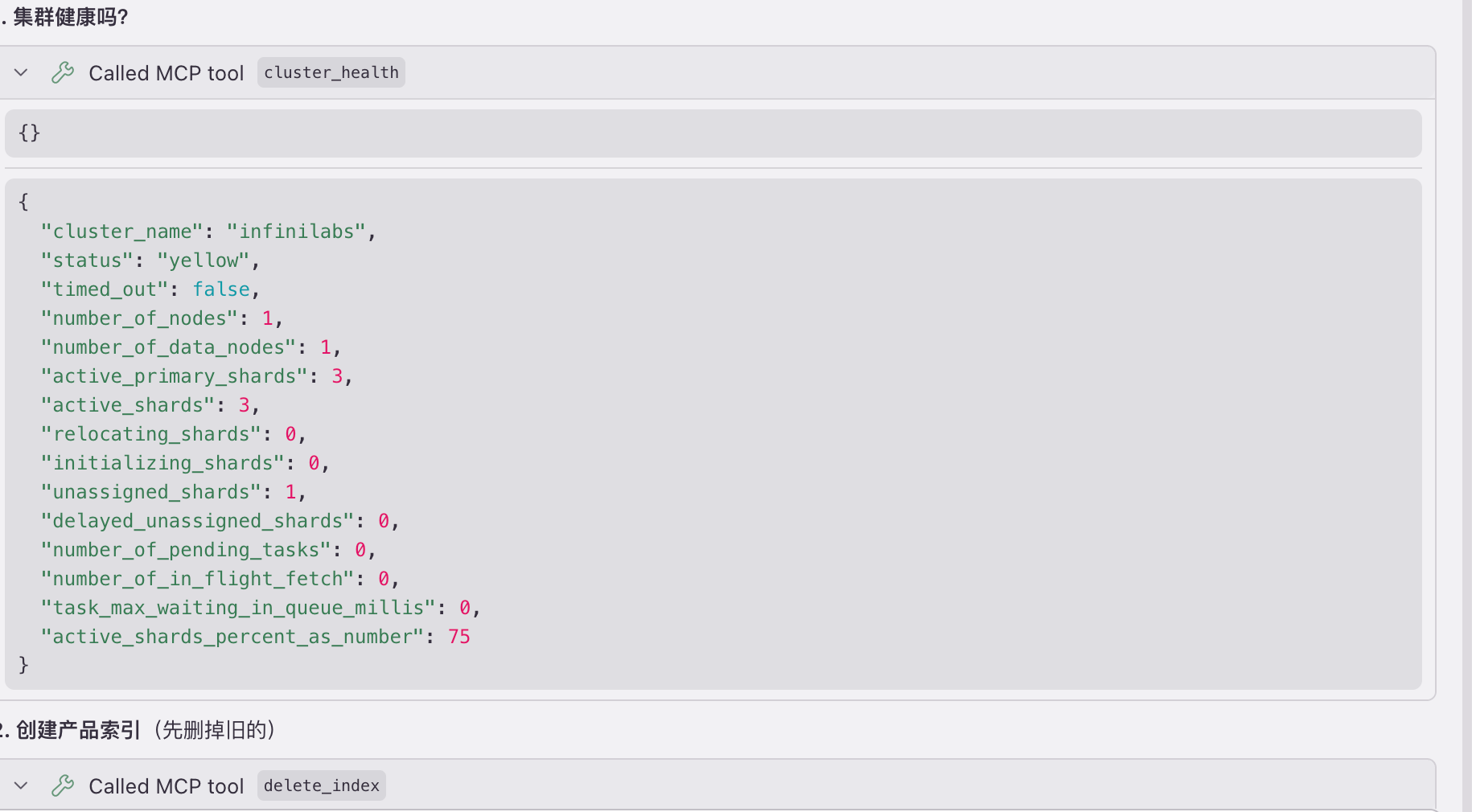
我:集群健康吗?
Kiro:
{
  "cluster_name": "infinilabs",
  "status": "green",
  "number_of_nodes": 1,
  "active_shards": 2,
  "active_shards_percent_as_number": 100.0
}
🟢 集群很健康!状态 green,1 个节点,2 个活跃分片,100% 健康。
我:创建一个产品索引,有名称、价格、分类、描述字段
Kiro:
{
  "acknowledged": true,
  "shards_acknowledged": true,
  "index": "products"
}
产品索引创建成功!字段结构:
| 字段 | 类型 | 说明 |
|---|---|---|
| name | text | 产品名称,支持中文分词搜索 |
| price | integer | 价格 |
| category | keyword | 分类,精确匹配 |
| description | text | 描述,支持中文分词搜索 |
我:写入 5 个苹果产品
Kiro:
{
  "took": 23,
  "errors": false,
  "items_count": 5
}
5 个产品写入成功!
我:搜一下带芯片的产品
Kiro:
{
  "total": 3,
  "took_ms": 37,
  "hits": [
    {"_source": {"name": "iPad Air", "price": 4799, "category": "平板", "description": "M1芯片平板电脑"}},
    {"_source": {"name": "MacBook Pro 14", "price": 16999, "category": "电脑", "description": "M3 Pro芯片笔记本电脑"}},
    {"_source": {"name": "iPhone 15 Pro", "price": 8999, "category": "手机", "description": "苹果最新旗舰手机,A17芯片"}}
  ]
}
找到 3 个带芯片的产品!
我:5000 以下的有哪些?
Kiro:
{
  "total": 2,
  "hits": [
    {"_source": {"name": "AirPods Pro 2", "price": 1899, "category": "耳机"}},
    {"_source": {"name": "iPad Air", "price": 4799, "category": "平板"}}
  ]
}
5000 以下有 2 个:AirPods Pro 2(¥1899)和 iPad Air(¥4799)
我:按分类统计数量
Kiro:
{
  "buckets": [
    {"key": "平板", "count": 1},
    {"key": "手机", "count": 1},
    {"key": "手表", "count": 1},
    {"key": "电脑", "count": 1},
    {"key": "耳机", "count": 1}
  ]
}
我:平均价格多少?
Kiro:
{"value": 7839.0}
平均价格 ¥7839
全程不用写一行 DSL!我只说人话,Kiro 自动选择合适的工具、生成查询、返回结果。
什么是 MCP?
MCP(Model Context Protocol)是一个让 AI 调用外部工具的协议。简单说:
- 你定义一些"工具"(函数)
- AI 根据用户意图选择合适的工具
- AI 自动填参数、调用、返回结果
把 Easysearch 的操作封装成 MCP 工具,AI 就能帮你操作集群了。
为什么用 FastMCP?
FastMCP 是 MCP 官方提供的 Python 高级封装,让你用最少的代码写 MCP Server。
from mcp.server.fastmcp import FastMCP

mcp = FastMCP("easysearch")

@mcp.tool()
def cluster_health() -> dict:
    """获取集群健康状态"""
    # 实现逻辑...
    return result
FastMCP 的优势:
- 装饰器语法 -
@mcp.tool()一行搞定工具注册 - 自动生成 Schema - 根据函数签名和类型注解自动生成参数定义
- docstring 即描述 - 函数文档字符串自动变成工具描述,AI 根据这个选择调用哪个工具
- 同步函数支持 - 不用写 async/await
- 返回值自动序列化 - 直接 return dict,不用手动包装成 JSON
开始封装
项目结构
easysearch-mcp-server/
├── easysearch_mcp.py   # MCP 服务器代码
├── pyproject.toml      # 项目配置
└── README.md
安装依赖
pip install mcp httpx
核心代码
创建 easysearch_mcp.py:
"""
Easysearch MCP Server
让 AI Agent 能够操作 Easysearch(兼容 Elasticsearch API)
"""

import json
import os
from typing import Any
import httpx
from mcp.server.fastmcp import FastMCP

# 创建 MCP Server
mcp = FastMCP("easysearch")

# 配置 - 从环境变量读取
EASYSEARCH_URL = os.getenv("EASYSEARCH_URL", "http://localhost:9200")
EASYSEARCH_USER = os.getenv("EASYSEARCH_USER", "admin")
EASYSEARCH_PASSWORD = os.getenv("EASYSEARCH_PASSWORD", "admin")


def get_client() -> httpx.Client:
    """创建 HTTP 客户端"""
    return httpx.Client(
        base_url=EASYSEARCH_URL,
        auth=(EASYSEARCH_USER, EASYSEARCH_PASSWORD),
        verify=False,  # 如果用 HTTPS 自签名证书
        timeout=30.0
    )
封装集群信息工具
@mcp.tool()
def cluster_health() -> dict:
    """
    获取集群健康状态
    返回集群名称、状态(green/yellow/red)、节点数、分片数等信息
    """
    with get_client() as client:
        r = client.get("/_cluster/health")
        return r.json()


@mcp.tool()
def cluster_stats() -> dict:
    """
    获取集群统计信息
    包括文档数、存储大小、索引数量等
    """
    with get_client() as client:
        r = client.get("/_cluster/stats")
        data = r.json()
        # 精简返回,避免太长
        return {
            "cluster_name": data.get("cluster_name"),
            "status": data.get("status"),
            "nodes": data.get("nodes", {}).get("count", {}),
            "indices": {
                "count": data.get("indices", {}).get("count"),
                "docs": data.get("indices", {}).get("docs", {}),
                "store_size": data.get("indices", {}).get("store", {}).get("size_in_bytes")
            }
        }
封装索引操作工具
@mcp.tool()
def list_indices() -> list:
    """
    列出所有索引
    返回索引名称、文档数、存储大小、健康状态
    """
    with get_client() as client:
        r = client.get("/_cat/indices?format=json")
        indices = r.json()
        return [{
            "index": idx.get("index"),
            "health": idx.get("health"),
            "status": idx.get("status"),
            "docs_count": idx.get("docs.count"),
            "store_size": idx.get("store.size")
        } for idx in indices if not idx.get("index", "").startswith(".")]


@mcp.tool()
def get_index_mapping(index: str) -> dict:
    """
    获取索引的字段映射(schema)

    参数:
        index: 索引名称
    """
    with get_client() as client:
        r = client.get(f"/{index}/_mapping")
        return r.json()


@mcp.tool()
def create_index(index: str, mappings: dict = None, settings: dict = None) -> dict:
    """
    创建新索引

    参数:
        index: 索引名称
        mappings: 字段映射定义(可选)
        settings: 索引设置如分片数(可选)

    示例 mappings:
        {"properties": {"title": {"type": "text"}, "count": {"type": "integer"}}}
    """
    body = {}
    if mappings:
        body["mappings"] = mappings
    if settings:
        body["settings"] = settings

    with get_client() as client:
        r = client.put(f"/{index}", json=body if body else None)
        return r.json()


@mcp.tool()
def delete_index(index: str) -> dict:
    """
    删除索引(危险操作,会删除所有数据)

    参数:
        index: 要删除的索引名称
    """
    with get_client() as client:
        r = client.delete(f"/{index}")
        return r.json()
封装文档操作工具
@mcp.tool()
def index_document(index: str, document: dict, doc_id: str = None) -> dict:
    """
    写入单个文档

    参数:
        index: 索引名称
        document: 文档内容(JSON 对象)
        doc_id: 文档 ID(可选,不传则自动生成)
    """
    with get_client() as client:
        if doc_id:
            r = client.put(f"/{index}/_doc/{doc_id}", json=document)
        else:
            r = client.post(f"/{index}/_doc", json=document)
        return r.json()


@mcp.tool()
def get_document(index: str, doc_id: str) -> dict:
    """
    根据 ID 获取文档

    参数:
        index: 索引名称
        doc_id: 文档 ID
    """
    with get_client() as client:
        r = client.get(f"/{index}/_doc/{doc_id}")
        return r.json()


@mcp.tool()
def delete_document(index: str, doc_id: str) -> dict:
    """
    删除单个文档

    参数:
        index: 索引名称
        doc_id: 文档 ID
    """
    with get_client() as client:
        r = client.delete(f"/{index}/_doc/{doc_id}")
        return r.json()


@mcp.tool()
def bulk_index(index: str, documents: list) -> dict:
    """
    批量写入文档

    参数:
        index: 索引名称
        documents: 文档列表
    """
    lines = []
    for doc in documents:
        lines.append(json.dumps({"index": {"_index": index}}))
        lines.append(json.dumps(doc))
    body = "\n".join(lines) + "\n"

    with get_client() as client:
        r = client.post(
            "/_bulk",
            content=body,
            headers={"Content-Type": "application/x-ndjson"}
        )
        result = r.json()
        return {
            "took": result.get("took"),
            "errors": result.get("errors"),
            "items_count": len(result.get("items", []))
        }
封装搜索工具(重点!)
这是最有价值的部分,让 AI 帮你写 DSL:
@mcp.tool()
def search(index: str, query: dict, size: int = 10) -> dict:
    """
    执行搜索查询

    参数:
        index: 索引名称(可用 * 搜索所有索引)
        query: Elasticsearch DSL 查询
        size: 返回结果数量,默认 10

    示例 - 全文搜索:
        search("products", {"match": {"name": "iPhone"}})

    示例 - 精确匹配:
        search("products", {"term": {"status": "active"}})

    示例 - 范围查询:
        search("products", {"range": {"price": {"gte": 100, "lte": 500}}})
    """
    body = {
        "query": query,
        "size": size
    }

    with get_client() as client:
        r = client.post(f"/{index}/_search", json=body)
        result = r.json()

        hits = result.get("hits", {})
        return {
            "total": hits.get("total", {}).get("value", 0),
            "took_ms": result.get("took"),
            "hits": [{
                "_id": h.get("_id"),
                "_score": h.get("_score"),
                "_source": h.get("_source")
            } for h in hits.get("hits", [])]
        }


@mcp.tool()
def search_simple(index: str, keyword: str, field: str = "_all", size: int = 10) -> dict:
    """
    简单关键词搜索(适合不熟悉 DSL 的场景)

    参数:
        index: 索引名称
        keyword: 搜索关键词
        field: 搜索字段,默认全字段
        size: 返回数量
    """
    if field == "_all":
        query = {"query_string": {"query": keyword}}
    else:
        query = {"match": {field: keyword}}

    return search(index, query, size)
封装聚合统计工具
@mcp.tool()
def aggregate(index: str, field: str, agg_type: str = "terms", size: int = 10) -> dict:
    """
    聚合统计

    参数:
        index: 索引名称
        field: 聚合字段
        agg_type: 聚合类型 - terms(分组计数), avg, sum, min, max, cardinality(去重计数)
        size: 返回桶数量(仅 terms 有效)
    """
    if agg_type == "terms":
        agg_body = {"terms": {"field": field, "size": size}}
    else:
        agg_body = {agg_type: {"field": field}}

    body = {
        "size": 0,
        "aggs": {"result": agg_body}
    }

    with get_client() as client:
        r = client.post(f"/{index}/_search", json=body)
        result = r.json()

        agg_result = result.get("aggregations", {}).get("result", {})

        if agg_type == "terms":
            return {
                "buckets": [{
                    "key": b.get("key"),
                    "count": b.get("doc_count")
                } for b in agg_result.get("buckets", [])]
            }
        else:
            return {"value": agg_result.get("value")}
启动入口
if __name__ == "__main__":
    mcp.run()
配置 Kiro
在项目根目录创建 .kiro/settings/mcp.json:
{
  "mcpServers": {
    "easysearch": {
      "command": "python",
      "args": ["/path/to/easysearch_mcp.py"],
      "env": {
        "EASYSEARCH_URL": "https://localhost:9200",
        "EASYSEARCH_USER": "admin",
        "EASYSEARCH_PASSWORD": "your-password"
      },
      "autoApprove": [
        "cluster_health",
        "list_indices",
        "cluster_stats",
        "create_index",
        "bulk_index",
        "get_index_mapping",
        "search_simple",
        "search",
        "aggregate",
        "index_document",
        "get_document",
        "delete_document",
        "delete_index"
      ]
    }
  }
}
配置说明:
command: Python 解释器路径,建议用绝对路径如/usr/bin/python3args: MCP 服务器脚本的绝对路径env: 环境变量,配置 Easysearch 连接信息autoApprove: 自动批准的工具列表。默认情况下 Kiro 调用 MCP 工具前会弹窗让你确认,把工具名加到这个列表里就会自动执行,不用每次点确认,对话更流畅
重新加载 MCP:Cmd+Shift+P → 搜索 "Reconnect MCP Servers" 执行即可。
连接成功后,在 Kiro 左侧面板的 "MCP Servers" 视图里可以看到 easysearch 显示为绿色。
更多对话示例
继续看几个实际操作:
我:有哪些索引?
Kiro:(调用 list_indices)
{
  "index": "products",
  "health": "yellow",
  "status": "open",
  "docs_count": "5",
  "store_size": "5.7kb"
}
目前有 1 个索引 products,包含 5 个文档。
我:products 索引有什么字段?
Kiro:(调用 get_index_mapping)
{
  "products": {
    "mappings": {
      "properties": {
        "category": {"type": "keyword"},
        "description": {"type": "text"},
        "name": {"type": "text"},
        "price": {"type": "integer"}
      }
    }
  }
}
products 索引有 4 个字段:name、price、category、description。
我:集群有多少文档?
Kiro:(调用 cluster_stats)
{
  "cluster_name": "infinilabs",
  "status": "green",
  "indices": {
    "count": 3,
    "docs": {"count": 13, "deleted": 0},
    "store_size": 52841
  }
}
集群共有 3 个索引,13 个文档,存储大小约 52KB。
我:写入单个文档
Kiro:(调用 index_document)
{
  "_index": "products",
  "_id": "magsafe-001",
  "result": "created"
}
我:查一下 ID 是 magsafe-001 的文档
Kiro:(调用 get_document)
{
  "_id": "magsafe-001",
  "found": true,
  "_source": {
    "category": "配件",
    "description": "MagSafe 磁吸无线充电器",
    "name": "MagSafe 充电器",
    "price": 329
  }
}
我:搜一下手机分类的产品
Kiro:(调用 search,生成 term 查询)
{
  "total": 1,
  "hits": [
    {"_source": {"name": "iPhone 15 Pro", "price": 8999, "category": "手机", "description": "苹果最新旗舰手机,A17芯片"}}
  ]
}
我:价格最高的是哪个?
Kiro:(调用 aggregate,agg_type=max)
{"value": 16999.0}
最高价格是 ¥16999(MacBook Pro 14)
我:价格最低呢?
Kiro:(调用 aggregate,agg_type=min)
{"value": 1899.0}
最低价格是 ¥1899(AirPods Pro 2)
我:算一下总价
Kiro:(调用 aggregate,agg_type=sum)
{"value": 39195.0}
5 个产品总价 ¥39195
我:删掉这个文档
Kiro:(调用 delete_document)
{
  "_id": "magsafe-001",
  "result": "deleted"
}
我:删掉 products 索引
Kiro:(调用 delete_index)
{"acknowledged": true}
索引已删除!
工具清单
封装完成后,AI 可以使用这 12 个工具:
| 工具 | 功能 | 典型用法 |
|---|---|---|
cluster_health | 集群健康状态 | "集群状态怎么样" |
cluster_stats | 集群统计 | "有多少文档" |
list_indices | 列出索引 | "有哪些索引" |
get_index_mapping | 查看字段结构 | "products 索引有什么字段" |
create_index | 创建索引 | "创建一个用户索引" |
delete_index | 删除索引 | "删掉 test 索引" |
index_document | 写入文档 | "添加一个产品" |
get_document | 获取文档 | "查一下 ID 是 xxx 的文档" |
delete_document | 删除文档 | "删掉这个文档" |
bulk_index | 批量写入 | "导入这批数据" |
search | DSL 搜索 | "价格 1000-5000 的产品" |
search_simple | 关键词搜索 | "搜一下 iPhone" |
aggregate | 聚合统计 | "按分类统计" |
设计要点
1. 工具描述要清晰
AI 根据工具描述选择调用哪个,描述写得好,AI 选得准:
@mcp.tool()
def search_simple(index: str, keyword: str, ...):
    """
    简单关键词搜索(适合不熟悉 DSL 的场景)  # 说明用途

    参数:
        index: 索引名称
        keyword: 搜索关键词  # 参数说明
    """
2. 返回结果要精简
Easysearch 原始返回包含大量元数据,动辄几百行。直接返回给 AI 会占用太多 token,也会干扰理解。精简后只保留关键信息:
return {
    "total": hits.get("total", {}).get("value", 0),
    "took_ms": result.get("took"),
    "hits": [{
        "_id": h.get("_id"),
        "_score": h.get("_score"),
        "_source": h.get("_source")
    } for h in hits.get("hits", [])]
}
3. 提供简化版工具
search 需要写 DSL,search_simple 只要关键词。AI 会根据场景选择:
- 用户说"搜 iPhone" → 用
search_simple - 用户说"价格 1000-5000" → 用
search生成 range 查询
扩展思路
这个 MCP 还可以继续扩展:
- 添加更多搜索类型:bool 组合查询、fuzzy 模糊搜索、highlight 高亮
- 索引管理:reindex、别名管理、模板管理
- 集群运维:节点信息、分片分配、慢查询日志
- 数据导入导出:从 CSV/JSON 文件批量导入
总结
通过 MCP 封装 Easysearch:
- 告别 DSL 记忆负担 - AI 帮你生成查询语句
- 自然语言交互 - 说人话就能操作集群
- 降低使用门槛 - 不懂 ES 的人也能用
- 提高效率 - 复杂查询秒出结果
完整代码已开源,拿去用吧!
附录:完整源码
Kiro MCP 配置文件
.kiro/settings/mcp.json:
{
  "mcpServers": {
    "easysearch": {
      "command": "python",
      "args": ["/path/to/easysearch_mcp.py"],
      "env": {
        "EASYSEARCH_URL": "https://localhost:9200",
        "EASYSEARCH_USER": "admin",
        "EASYSEARCH_PASSWORD": "your-password"
      },
      "autoApprove": [
        "cluster_health",
        "list_indices",
        "cluster_stats",
        "create_index",
        "bulk_index",
        "get_index_mapping",
        "search_simple",
        "search",
        "aggregate",
        "index_document",
        "get_document",
        "delete_document",
        "delete_index"
      ]
    }
  }
}
MCP Server 完整源码
easysearch_mcp.py:
"""
Easysearch MCP Server
让 AI Agent 能够操作 Easysearch(兼容 Elasticsearch API)
"""

import json
import os
from typing import Any
import httpx
from mcp.server.fastmcp import FastMCP

# 创建 MCP Server
mcp = FastMCP("easysearch")

# 配置 - 从环境变量读取
EASYSEARCH_URL = os.getenv("EASYSEARCH_URL", "http://localhost:9200")
EASYSEARCH_USER = os.getenv("EASYSEARCH_USER", "admin")
EASYSEARCH_PASSWORD = os.getenv("EASYSEARCH_PASSWORD", "admin")


def get_client() -> httpx.Client:
    """创建 HTTP 客户端"""
    return httpx.Client(
        base_url=EASYSEARCH_URL,
        auth=(EASYSEARCH_USER, EASYSEARCH_PASSWORD),
        verify=False,  # 如果用 HTTPS 自签名证书
        timeout=30.0
    )


# ============ 集群信息 ============

@mcp.tool()
def cluster_health() -> dict:
    """
    获取集群健康状态
    返回集群名称、状态(green/yellow/red)、节点数、分片数等信息
    """
    with get_client() as client:
        r = client.get("/_cluster/health")
        return r.json()


@mcp.tool()
def cluster_stats() -> dict:
    """
    获取集群统计信息
    包括文档数、存储大小、索引数量等
    """
    with get_client() as client:
        r = client.get("/_cluster/stats")
        data = r.json()
        # 精简返回,避免太长
        return {
            "cluster_name": data.get("cluster_name"),
            "status": data.get("status"),
            "nodes": data.get("nodes", {}).get("count", {}),
            "indices": {
                "count": data.get("indices", {}).get("count"),
                "docs": data.get("indices", {}).get("docs", {}),
                "store_size": data.get("indices", {}).get("store", {}).get("size_in_bytes")
            }
        }


# ============ 索引操作 ============

@mcp.tool()
def list_indices() -> list:
    """
    列出所有索引
    返回索引名称、文档数、存储大小、健康状态
    """
    with get_client() as client:
        r = client.get("/_cat/indices?format=json")
        indices = r.json()
        return [{
            "index": idx.get("index"),
            "health": idx.get("health"),
            "status": idx.get("status"),
            "docs_count": idx.get("docs.count"),
            "store_size": idx.get("store.size")
        } for idx in indices if not idx.get("index", "").startswith(".")]


@mcp.tool()
def get_index_mapping(index: str) -> dict:
    """
    获取索引的字段映射(schema)

    参数:
        index: 索引名称
    """
    with get_client() as client:
        r = client.get(f"/{index}/_mapping")
        return r.json()


@mcp.tool()
def create_index(index: str, mappings: dict = None, settings: dict = None) -> dict:
    """
    创建新索引

    参数:
        index: 索引名称
        mappings: 字段映射定义(可选)
        settings: 索引设置如分片数(可选)

    示例 mappings:
        {"properties": {"title": {"type": "text"}, "count": {"type": "integer"}}}
    """
    body = {}
    if mappings:
        body["mappings"] = mappings
    if settings:
        body["settings"] = settings

    with get_client() as client:
        r = client.put(f"/{index}", json=body if body else None)
        return r.json()


@mcp.tool()
def delete_index(index: str) -> dict:
    """
    删除索引(危险操作,会删除所有数据)

    参数:
        index: 要删除的索引名称
    """
    with get_client() as client:
        r = client.delete(f"/{index}")
        return r.json()


# ============ 文档操作 ============

@mcp.tool()
def index_document(index: str, document: dict, doc_id: str = None) -> dict:
    """
    写入单个文档

    参数:
        index: 索引名称
        document: 文档内容(JSON 对象)
        doc_id: 文档 ID(可选,不传则自动生成)

    示例:
        index_document("products", {"name": "iPhone", "price": 999})
    """
    with get_client() as client:
        if doc_id:
            r = client.put(f"/{index}/_doc/{doc_id}", json=document)
        else:
            r = client.post(f"/{index}/_doc", json=document)
        return r.json()


@mcp.tool()
def get_document(index: str, doc_id: str) -> dict:
    """
    根据 ID 获取文档

    参数:
        index: 索引名称
        doc_id: 文档 ID
    """
    with get_client() as client:
        r = client.get(f"/{index}/_doc/{doc_id}")
        return r.json()


@mcp.tool()
def delete_document(index: str, doc_id: str) -> dict:
    """
    删除单个文档

    参数:
        index: 索引名称
        doc_id: 文档 ID
    """
    with get_client() as client:
        r = client.delete(f"/{index}/_doc/{doc_id}")
        return r.json()


@mcp.tool()
def bulk_index(index: str, documents: list) -> dict:
    """
    批量写入文档

    参数:
        index: 索引名称
        documents: 文档列表

    示例:
        bulk_index("products", [{"name": "A"}, {"name": "B"}])
    """
    # 构建 bulk 请求体
    lines = []
    for doc in documents:
        lines.append(json.dumps({"index": {"_index": index}}))
        lines.append(json.dumps(doc))
    body = "\n".join(lines) + "\n"

    with get_client() as client:
        r = client.post(
            "/_bulk",
            content=body,
            headers={"Content-Type": "application/x-ndjson"}
        )
        result = r.json()
        return {
            "took": result.get("took"),
            "errors": result.get("errors"),
            "items_count": len(result.get("items", []))
        }


# ============ 搜索 ============

@mcp.tool()
def search(index: str, query: dict, size: int = 10) -> dict:
    """
    执行搜索查询

    参数:
        index: 索引名称(可用 * 搜索所有索引)
        query: Elasticsearch DSL 查询
        size: 返回结果数量,默认 10

    示例 - 全文搜索:
        search("products", {"match": {"name": "iPhone"}})

    示例 - 精确匹配:
        search("products", {"term": {"status": "active"}})

    示例 - 范围查询:
        search("products", {"range": {"price": {"gte": 100, "lte": 500}}})
    """
    body = {
        "query": query,
        "size": size
    }

    with get_client() as client:
        r = client.post(f"/{index}/_search", json=body)
        result = r.json()

        hits = result.get("hits", {})
        return {
            "total": hits.get("total", {}).get("value", 0),
            "took_ms": result.get("took"),
            "hits": [{
                "_id": h.get("_id"),
                "_score": h.get("_score"),
                "_source": h.get("_source")
            } for h in hits.get("hits", [])]
        }


@mcp.tool()
def search_simple(index: str, keyword: str, field: str = "_all", size: int = 10) -> dict:
    """
    简单关键词搜索(适合不熟悉 DSL 的场景)

    参数:
        index: 索引名称
        keyword: 搜索关键词
        field: 搜索字段,默认全字段
        size: 返回数量

    示例:
        search_simple("products", "iPhone")
        search_simple("logs", "error", field="message")
    """
    if field == "_all":
        query = {"query_string": {"query": keyword}}
    else:
        query = {"match": {field: keyword}}

    return search(index, query, size)


@mcp.tool()
def aggregate(index: str, field: str, agg_type: str = "terms", size: int = 10) -> dict:
    """
    聚合统计

    参数:
        index: 索引名称
        field: 聚合字段
        agg_type: 聚合类型 - terms(分组计数), avg, sum, min, max, cardinality(去重计数)
        size: 返回桶数量(仅 terms 有效)

    示例:
        aggregate("orders", "status", "terms")  # 按状态分组计数
        aggregate("orders", "amount", "avg")    # 计算平均金额
    """
    if agg_type == "terms":
        agg_body = {"terms": {"field": field, "size": size}}
    else:
        agg_body = {agg_type: {"field": field}}

    body = {
        "size": 0,
        "aggs": {"result": agg_body}
    }

    with get_client() as client:
        r = client.post(f"/{index}/_search", json=body)
        result = r.json()

        agg_result = result.get("aggregations", {}).get("result", {})

        if agg_type == "terms":
            return {
                "buckets": [{
                    "key": b.get("key"),
                    "count": b.get("doc_count")
                } for b in agg_result.get("buckets", [])]
            }
        else:
            return {"value": agg_result.get("value")}


# ============ 运行 ============

if __name__ == "__main__":
    mcp.run()
评论
0暂无评论