
'%3e%3cpath%20d='M9%2021H15'%20stroke='black'%20stroke-width='2'%20stroke-linecap='round'%20stroke-linejoin='round'/%3e%3cpath%20d='M5.25001%209.75C5.25001%207.95979%205.96116%206.2429%207.22703%204.97703C8.4929%203.71116%2010.2098%203%2012%203C13.7902%203%2015.5071%203.71116%2016.773%204.97703C18.0388%206.2429%2018.75%207.95979%2018.75%209.75C18.75%2013.1081%2019.5281%2015.8063%2020.1469%2016.875C20.2126%2016.9888%2020.2472%2017.1179%2020.2474%2017.2493C20.2475%2017.3808%2020.2131%2017.5099%2020.1475%2017.6239C20.082%2017.7378%2019.9877%2017.8325%2019.8741%2017.8985C19.7604%2017.9645%2019.6314%2017.9995%2019.5%2018H4.50001C4.36874%2017.9992%204.23997%2017.964%204.12659%2017.8978C4.0132%2017.8317%203.91916%2017.7369%203.85387%2017.6231C3.78858%2017.5092%203.75432%2017.3801%203.75452%2017.2489C3.75472%2017.1176%203.78937%2016.9887%203.85501%2016.875C4.47282%2015.8063%205.25001%2013.1072%205.25001%209.75Z'%20stroke='black'%20stroke-width='2'%20stroke-linecap='round'%20stroke-linejoin='round'/%3e%3c/g%3e%3cdefs%3e%3cclipPath%20id='clip0_4762_133'%3e%3crect%20width='24'%20height='24'%20fill='white'/%3e%3c/clipPath%3e%3c/defs%3e%3c/svg%3e)
'%3e%3cpath%20d='M24%200H0V24H24V0Z'%20fill='white'%20fill-opacity='0.01'/%3e%3cpath%20d='M12%2011C14.2091%2011%2016%209.20914%2016%207C16%204.79086%2014.2091%203%2012%203C9.79086%203%208%204.79086%208%207C8%209.20914%209.79086%2011%2012%2011Z'%20stroke='black'%20stroke-width='2'%20stroke-linecap='round'%20stroke-linejoin='round'/%3e%3cpath%20d='M4%2021V20.4857C4%2018.5655%204%2017.6055%204.38753%2016.872C4.72841%2016.2269%205.27235%2015.7024%205.94138%2015.3737C6.70196%2015%207.6976%2015%209.68889%2015H14.3111C16.3024%2015%2017.298%2015%2018.0586%2015.3737C18.7276%2015.7024%2019.2716%2016.2269%2019.6125%2016.872C20%2017.6055%2020%2018.5655%2020%2020.4857V21'%20stroke='black'%20stroke-width='2'%20stroke-linecap='round'%20stroke-linejoin='round'/%3e%3c/g%3e%3cdefs%3e%3cclipPath%20id='clip0_4762_139'%3e%3crect%20width='24'%20height='24'%20fill='white'/%3e%3c/clipPath%3e%3c/defs%3e%3c/svg%3e)

Coco-AI 支持嵌入,让你的网站拥有 AI 搜索力
忘机山人
发布于429天前博客图片修整中,看不了可以先搜索公众号“忘机山人”看。
https://appstore.lazycat.cloud/#/shop/detail/xu.deploy.coco-ai
Coco-AI 支持嵌入,让你的网站支持 AI 搜索
在之前的文章中,我们让 Hexo,hugo 博客 支持了 coco AI 检索,也就是说我们还得使用客户端来检索,那是不是把搜索放在博客上呢?
Coco-AI 在 0.3 的版本中
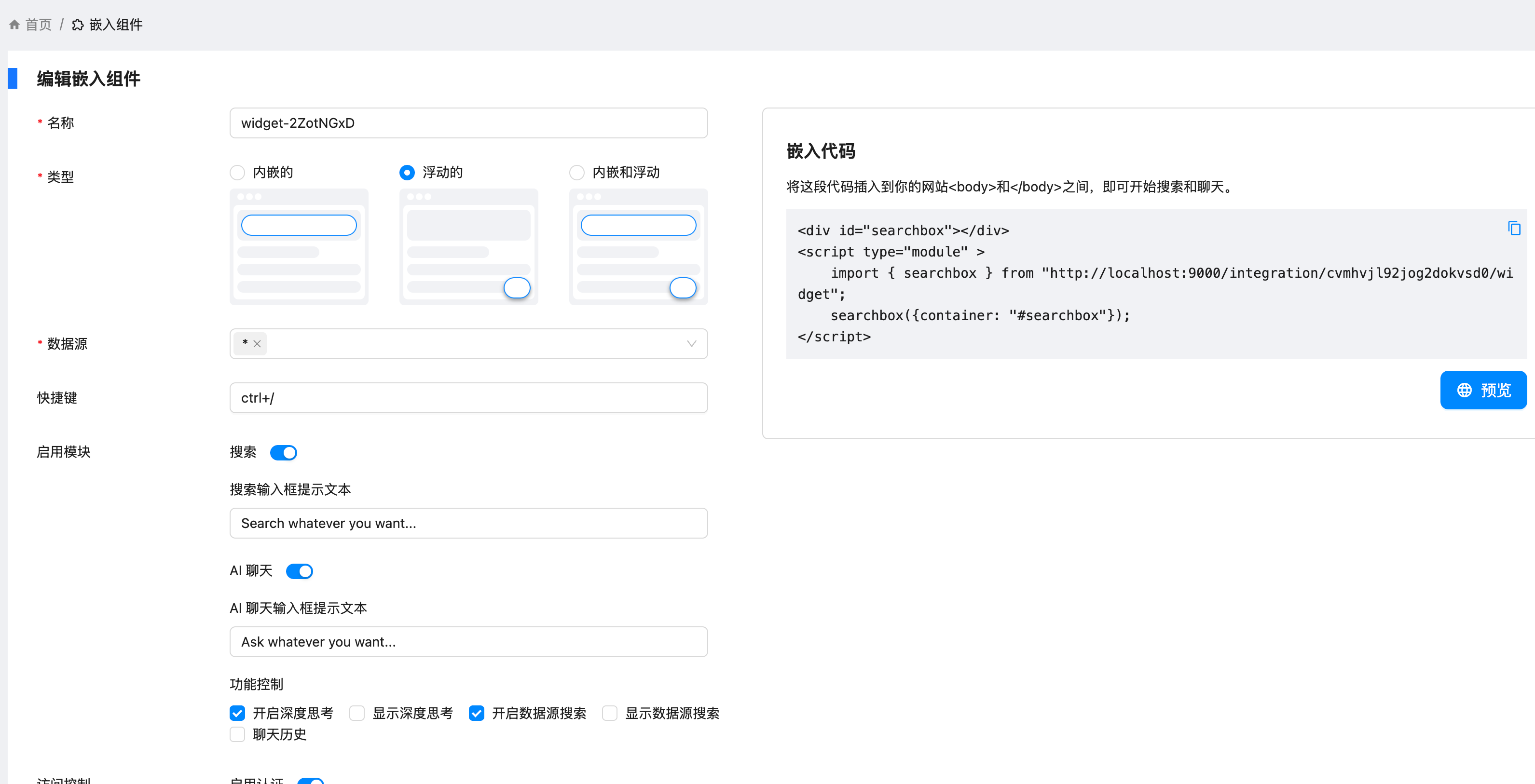
先找一个 html 来看个效果。
<!DOCTYPE html>
<html lang="zh-CN">
  <head>
    <meta charset="UTF-8" />
    <title>搜索组件嵌入示例</title>
    <style>
      body {
        font-family: sans-serif;
        padding: 2rem;
      }
      #searchbox {
        margin-top: 20px;
        border: 1px solid #ccc;
        padding: 16px;
        border-radius: 8px;
      }
    </style>
  </head>
  <body>
    <h1>欢迎使用 Cloudsmithy 搜索组件</h1>
    <p>下面是通过 ES Module 引入的搜索框:</p>

    <div id="searchbox"></div>

    <script type="module">
      import { searchbox } from "http://localhost:9000/integration/cvmhvjl92jog2dokvsd0/widget";

      searchbox({
        container: "#searchbox",
      });
    </script>
  </body>
</html>
💡 原始代码:
<div id="searchbox"></div>
<script type="module">
  import { searchbox } from "http://localhost:9000/integration/cvmhvjl92jog2dokvsd0/widget";
  searchbox({ container: "#searchbox" });
</script>
🧩 每部分解析
1. <div id="searchbox"></div>
这是一个空的 div 元素,作为挂载容器。你的 searchbox 组件会被渲染进这个 div。
- 就像 React 或 Vue 应用会挂载到
<div id="app">一样 - 你在这里指定了 id 为
searchbox,用于后面初始化组件时绑定
2. <script type="module">
这表示:这是一个 ES Module 格式的 JavaScript 脚本。
- 现代浏览器支持原生的模块化加载(无需打包器)
- 可以使用
import加载其他模块、组件
3. import { searchbox } from "http://localhost:9000/integration/cvmhvjl92jog2dokvsd0/widget";
从远程地址(本地服务器)中导入 searchbox 函数:
-
说明这个 URL 返回的是一个 JavaScript 模块,里面导出了
searchbox -
类似 Vue、React 中的组件库导入:
import { Button } from "element-plus";
4. searchbox({container: "#searchbox"});
调用 searchbox 函数,初始化组件,并挂载到页面中:
- 参数是一个对象,指明组件要渲染在哪个 DOM 元素里
container: "#searchbox"通过 CSS 选择器指定了上面那个div
🧠 通俗类比
就像你在网页上写:
<div id="chat"></div>
<script type="module">
  import { chatWidget } from "./chat.js";
  chatWidget({ container: "#chat" });
</script>
它就是在某个 div 中挂载一个聊天插件一样。你这段代码的本质就是嵌入并运行一个远程提供的 JS 组件。
✅ 总结一句话:
这段代码的作用是:
把远程加载的
searchbox组件挂载到网页上的<div id="searchbox">中,完成动态插入功能。
如果你希望我反向帮你写出那个 searchbox 模块怎么写,或者做成本地文件测试,也可以告诉我~
下面是一个可以在任意网站自动嵌入你给出的 <div> 和 <script> 的油猴(Tampermonkey)脚本示例:
✅ 功能说明
- 在页面加载完成后,向
<body>插入一个#searchbox的div - 加载你的远程模块并初始化
searchbox组件
一开始打算在 hexo 的组件上改,但是在编译阶段有问题,索性使用油猴脚本来实现
🐵 Tampermonkey 脚本示例
// ==UserScript==
// @name         Searchbox Embedder
// @namespace    http://tampermonkey.net/
// @version      0.1
// @description  在任意网页中注入 searchbox 小部件
// @author       You
// @match        *://*/*
// @grant        none
// @run-at       document-end
// ==/UserScript==

(function () {
  "use strict";

  // 创建 searchbox 容器
  const searchboxDiv = document.createElement("div");
  searchboxDiv.id = "searchbox";
  document.body.appendChild(searchboxDiv);

  // 动态加载模块脚本(ESM)
  const script = document.createElement("script");
  script.type = "module";
  script.textContent = `
        import { searchbox } from "http://localhost:9000/integration/cvmhvjl92jog2dokvsd0/widget";
        searchbox({ container: "#searchbox" });
    `;
  document.body.appendChild(script);
})();
⚠️ 注意事项
- 浏览器必须支持 ES Module。
- 若该域名不是 HTTPS,确保目标网页也是 HTTP,否则会被浏览器拦截跨协议内容。
- 若需局部生效,请将
@match改为具体的页面,例如:https://example.com/*
🌟 脚本整体作用
这个油猴脚本的作用是:在任何网页上自动插入一个 div#searchbox 容器,并加载你提供的远程模块脚本,渲染搜索框组件。
📜 脚本逐行解析
// ==UserScript==
// @name         Searchbox Embedder
@name是脚本的名字,显示在 Tampermonkey 的控制面板中。
// @namespace http://tampermonkey.net/
- 命名空间,可以用来区分多个脚本的作者或用途(不重要)。
// @version 0.1
- 脚本版本号。
// @description 在任意网页中注入 searchbox 小部件
- 简要说明这个脚本做什么。
// @author You
- 作者名,可以改成你自己的。
// @match *://*/*
- 匹配所有网站页面。如果你只想对某个特定网站注入,可将它改为:
// @match https://example.com/*
// @grant none
- 没有使用 Tampermonkey 的特殊权限(如 GM_* 方法),所以可以写
none。
// @run-at document-end
- 脚本在 DOM 加载完成后执行(类似
DOMContentLoaded)。
💻 主体逻辑解析
(function () {
    'use strict';
- 启用严格模式,避免某些低级错误。
// 创建 searchbox 容器
const searchboxDiv = document.createElement("div");
searchboxDiv.id = "searchbox";
document.body.appendChild(searchboxDiv);
- 创建一个
<div id="searchbox">并插入到<body>中,作为挂载点。
// 动态加载模块脚本(ESM)
const script = document.createElement("script");
script.type = "module";
- 创建一个新的
<script type="module">,用来加载 ES 模块。
script.textContent = `
        import { searchbox } from "http://localhost:9000/integration/cvmhvjl92jog2dokvsd0/widget";
        searchbox({ container: "#searchbox" });
    `;
- 直接把模块内容写入 script 标签中:
- 从你本地地址加载
searchbox组件 - 调用
searchbox({ container: "#searchbox" })初始化它
- 从你本地地址加载
    document.body.appendChild(script);
})();
- 把这个
<script type="module">插入到<body>中,触发模块加载和执行。
✅ 总结
这个脚本做了三件事:
- 在网页中插入一个
div#searchbox - 动态加载你本地的模块组件
- 初始化这个组件并挂载到
#searchbox上
评论
0暂无评论